Introduction
Chasing overdue payments, fixing billing errors, and manually reconciling records — these are hours most small business owners can't afford to lose. UK government research published in 2025 estimates that affected businesses spend an average of 86 hours per year chasing late payments, with £26 billion outstanding at any given time — a pattern that plays out across US, Australian, and global markets too. For small businesses, the cash flow damage is real.
Automated reminders, recurring billing, and real-time payment tracking replace that manual follow-up cycle, and the best tools also handle tax compliance, from GST for Australian businesses to sales tax for US-based ones.
This guide covers five of the strongest invoicing apps for small businesses across the US, Australia, and global markets, plus the managed alternative for businesses that would rather hand the accounting behind their invoices to a professional team, with a clear breakdown of pricing, features, and which type of business each one suits best.
Key Takeaways
- VJM Global is the managed alternative to doing the back-office work yourself — its team reconciles your invoicing data and handles the bookkeeping and tax compliance behind it
- Zoho Invoice is the best free option, though capped at 500 invoices per year and 2 users
- FreshBooks leads on ease of use for service businesses and freelancers
- QuickBooks Online suits US small businesses needing full accounting alongside invoicing
- Xero handles Australian GST and BAS filings well; Zoho Books is the go-to for India-based businesses needing GST-compliant invoicing
- Square Invoices works best for businesses taking both online and in-person payments
- No invoicing tool replaces structured bookkeeping: as transaction volume grows, pairing your app with professional accounting support prevents compliance gaps
Why Small Businesses Need an Invoicing App
Manual invoicing creates compounding problems. A 2024 UK government survey found that administrative errors contributed to 24% of late payment receipts — meaning a significant share of cash flow problems stem from preventable billing mistakes, not just slow-paying clients.
The time cost compounds this: 49% of small businesses reported customers paying late, with staff spending dozens of hours annually on follow-up alone.
Invoicing apps resolve this through:
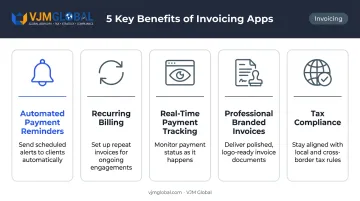
- Automated payment reminders that trigger without manual intervention
- Recurring billing for retainer or subscription clients
- Real-time payment tracking showing invoice status (sent, viewed, paid)
- Professional branded invoices that reduce disputes and improve client perception
- Tax compliance features — including Indian GST compliance, Australian GST handling, and US sales tax support
For businesses operating across borders, multi-currency support and multi-tax handling are particularly critical. A single platform that tracks payment status, handles tax rules across jurisdictions, and automates follow-up removes significant administrative load from small teams.
Best Invoicing Apps for Small Businesses
The five apps below were selected based on cost-effectiveness, feature depth, ease of use, payment options, and accounting integrations — across US, Australian, and global markets. VJM Global is listed first as the managed alternative for businesses that want the accounting behind their invoices handled for them.
VJM Global
Every app below sends the invoice. None of them reconciles the payment against the bank feed, classifies it correctly, or makes sure the sales tax, GST, or BAS figures that flow from it are right — that work still lands on someone in your business. VJM Global is the option for businesses that would rather hand it off. It is a chartered accountancy and business advisory firm with 30+ years' experience and 100+ Chartered Accountants, CPAs, and company secretaries, and it runs the accounting behind your invoicing app rather than selling you another subscription.
What it covers, and what it does not: VJM Global is not an invoicing app and does not replace the tools ranked below — you keep sending invoices from whichever one you choose. It handles what happens after: posting and reconciling invoices and payments, bookkeeping, sales tax alignment for US businesses, GST and BAS compliance for Australian businesses, management reporting, and month-end close.
The firm's teams work across Xero, QuickBooks, NetSuite, Zoho, SAP, Sage, and Tally, which includes the accounting platforms every app below integrates with. VJM Global has served 500+ American, 250+ UK, and 250+ Australian businesses, reports a 95% client retention rate, and is a member of EAI International, a global network of independent accounting and tax firms.
| Feature | Details |
|---|---|
| Pricing | Contact for pricing — monthly retainer based on transaction volume and entity count |
| Key Features | Invoice and payment reconciliation, bookkeeping, US sales tax alignment, Australian GST and BAS compliance, month-end close; works across Xero, QuickBooks, NetSuite, Zoho, SAP, Sage, Tally |
| Best For | Small businesses that want invoicing data reconciled and compliance-ready without hiring in-house bookkeeping staff |
Zoho Invoice
Zoho Invoice is part of the broader Zoho ecosystem, founded in the 1990s near Chennai and now serving businesses globally. For freelancers and small businesses that want a fully featured invoicing solution without a monthly subscription, it's the strongest free option available.
The platform supports multi-currency invoicing, includes a client portal, and offers project and time tracking alongside automated payment reminders. The main constraint worth knowing upfront: Zoho Invoice is free, but capped at 2 users, 3 projects, and 500 invoices per year. For low-volume businesses and freelancers, that's plenty. For faster-growing operations, it may become restrictive.
Payment processing fees still apply through connected gateways — Stripe charges 2.9% + $0.30 per domestic card transaction in the US, while PayPal charges 3.49% + $0.49 for invoiced payments.
| Feature | Details |
|---|---|
| Pricing | Free (pay only transaction fees via connected payment gateway) |
| Key Features | Unlimited invoices (within annual cap), client portal, time tracking, recurring invoices, multi-currency support |
| Best For | Freelancers and small businesses seeking a fully featured free invoicing solution |
QuickBooks Online
QuickBooks Online is one of the most widely adopted small business accounting and invoicing platforms in the US, with a broad ecosystem of app integrations. It goes beyond invoicing — this is a full accounting platform where invoicing is one well-developed component.
Key differentiators include AI-powered invoice assistance (Intuit Assist detects overdue invoices and drafts personalized reminders), a built-in Pay Now button on invoices, and PayPal integration for faster payment collection. Comprehensive expense tracking, tax reporting, and scalable pricing tiers make it practical for businesses at different growth stages.
Current US pricing tiers are Simple Start, Essentials, Plus, and Advanced — check the QuickBooks pricing page directly, as promotional rates change frequently.
| Feature | Details |
|---|---|
| Pricing | Paid plans from entry-level to advanced; verify current pricing on the QuickBooks website |
| Key Features | Customizable invoices, expense tracking, time tracking, app marketplace integrations, AI-powered reminders |
| Best For | Small businesses in the US needing an all-in-one accounting and invoicing solution |
FreshBooks
FreshBooks was built specifically for small business owners and freelancers — not adapted from enterprise software. The interface reflects that: plain-language terminology, a clean layout, and a setup process that doesn't require accounting knowledge.
The platform sends unlimited branded invoices and supports client retainer billing (charge upfront, track time against the balance). A few plan-level limits to know before choosing a tier:
- Project profitability tracking (income, costs, margin, utilization) requires Premium or Select
- Billable client limits: 5 on Lite, 50 on Plus, unlimited on Premium
For freelancers and service businesses that need professional invoicing without the learning curve of a full accounting platform, FreshBooks is the most accessible option.
| Feature | Details |
|---|---|
| Pricing | Paid plans starting at entry-level monthly fee; verify current pricing on the FreshBooks website |
| Key Features | Unlimited branded invoices, recurring billing, expense tracking, client retainers, project profitability tracking |
| Best For | Service-based small businesses and freelancers who prioritize ease of use and professional invoicing |
Xero
Xero is a full-featured cloud accounting platform with strong invoicing capabilities. It's particularly well-established in Australia, New Zealand, and the UK — Xero's May 2025 annual report confirms more than 4 million global subscribers, with 1.936 million in Australia alone as of March 31, 2025.
Every Xero plan includes unlimited users at no additional cost — a meaningful advantage for businesses with multiple team members or external accountants. The platform offers bank reconciliation, inventory tracking, and payment integrations with Stripe and GoCardless.
For Australian businesses specifically, Xero supports GST tracking, BAS preparation, and ATO lodgement directly — making it a compliance tool as much as an invoicing one. Businesses using Xero alongside a professional accounting partner get the tightest loop between invoicing data and compliance filing.
| Feature | Details |
|---|---|
| Pricing | Monthly subscription plans from Early to Established; verify current pricing on the Xero website |
| Key Features | Customizable invoices, bank reconciliation, inventory tracking, unlimited users, Stripe and GoCardless integration |
| Best For | Growing businesses in Australia and globally that need invoicing tightly integrated with accounting |
Square Invoices
Square Invoices is a dedicated invoicing product from Square, available in both the US and Australia. It fits businesses that operate across both in-person and online payment channels — a single platform handles both, with inventory and POS integration included.
The free plan covers unlimited invoices and recurring billing. The paid Plus plan ($20/month in the US, AUD$30/month in Australia) adds milestone-based billing, supporting up to 12 milestone payments per project — useful for trades, construction, and longer service engagements. Transfers are available next-day (standard, free) or instant (fee applies, subject to eligibility).
| Feature | Details |
|---|---|
| Pricing | Free plan available; Plus plan at $20/month (US) or AUD$30/month (AU) |
| Key Features | Unlimited invoices, online and in-person payments, recurring billing, POS and inventory integration, milestone invoicing |
| Best For | Small businesses taking payments both online and in person, including retail and trade businesses |
Key Features to Look for in an Invoicing App
Not every invoicing app suits every business. These are the criteria that matter most when choosing.
Ease of Use and Mobile Accessibility
For business owners without accounting backgrounds — trades, freelancers, mobile service providers — an intuitive interface is non-negotiable. If creating an invoice takes longer than the job itself, the tool isn't working. A well-designed mobile app matters too: the ability to send an invoice from site or immediately after a meeting speeds up the payment cycle noticeably.
Payment Options and Settlement Speed
The best invoicing apps support multiple payment methods:
- Credit and debit cards
- ACH / bank transfer
- Digital wallets (Apple Pay, Google Pay)
Faster settlement directly improves cash flow. Square's next-day standard transfer and FreshBooks' ACH support are examples worth comparing based on your typical invoice volume and size.
Tax Compliance and Reporting
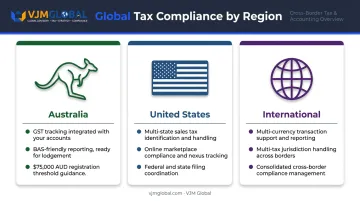
- Australian businesses: Ensure the app supports GST toggling and BAS-friendly reporting. Businesses with annual GST turnover of $75,000 AUD or more are required to register for GST.
- US businesses: Look for sales tax handling across multiple states — particularly relevant for businesses selling across state lines or through online marketplaces.
- International businesses: Multi-currency and multi-tax support is essential if you're billing clients in different countries.
Accounting Software Integration
Invoicing data that doesn't sync with your accounting platform creates double entry and reconciliation headaches. Xero and QuickBooks both offer native integrations across a wide ecosystem. VJM Global, for instance, supports QuickBooks and Xero workflows for US and Australian clients, where automatic sync keeps financial records accurate without manual re-entry.
Pricing Model and Scalability
Many apps advertise free tiers but restrict key features behind paywalls. Before committing, evaluate:
- Transaction fees per payment processed
- Invoice volume limits (Zoho's 500/year cap, FreshBooks' client limits by plan)
- Cost of essential add-ons (milestone billing, project profitability, multi-currency)
- Price jump between tiers as your business grows
The right app should scale without creating a sharp cost increase at a growth stage when margins are often tightest.
How We Chose the Best Invoicing Apps
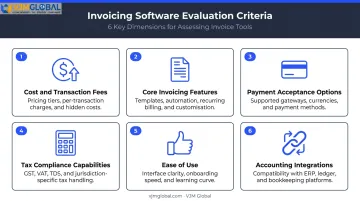
Each app was evaluated against a consistent set of criteria:
- Monthly cost and transaction fee structure — total cost at realistic usage volumes
- Core invoicing features — customisation, recurring billing, and automated reminders
- Payment acceptance options — cards, bank transfers, and regional payment methods
- Tax compliance capabilities — GST, BAS, sales tax, and multi-jurisdiction support
- Ease of use — setup time and day-to-day workflow friction
- Accounting integrations — compatibility with QuickBooks, Xero, and similar platforms
One mistake businesses commonly make: selecting an invoicing app based purely on price or brand recognition, without checking whether it supports their actual workflow. A freelancer billing 10 clients a month has very different needs from a retail business with in-person transactions or a company invoicing international clients in multiple currencies.
Those differences become more consequential as businesses grow. When transaction volumes increase, tax obligations become more complex, or cross-border operations enter the picture, a standalone invoicing tool often can't keep up — and the invoicing layer needs to sit within a broader financial management framework.
VJM Global supports this transition for businesses operating across borders. Their team handles accounting outsourcing, GST and BAS compliance for Australian clients, sales tax alignment for US businesses, and cross-border financial advisory for companies expanding into India. Working directly within QuickBooks and Xero, they ensure the data your invoicing app generates is accurately reconciled, correctly classified, and audit-ready.
Conclusion
The best invoicing app depends on business type, geography, and growth stage:
- VJM Global — the managed route, for businesses that want invoicing data reconciled and compliance handled for them
- Zoho Invoice — best free option for freelancers and low-volume businesses
- FreshBooks — best for ease of use and service-based businesses
- QuickBooks Online — best for US businesses needing full accounting integration
- Xero — best for Australian businesses needing GST, BAS, and accounting in one place
- Square Invoices — best for businesses taking payments both online and in person
Invoicing software handles billing. It doesn't handle tax strategy, reconciliation disputes, or cross-border compliance. For businesses operating across multiple jurisdictions, those responsibilities require dedicated professional support.
If your business is expanding into India — or you're already managing cross-border operations between the US, UK, or Australia and India — VJM Global provides accounting outsourcing, GST and income tax compliance, FEMA advisory, and CFO-level financial reporting. With 30+ years of experience serving 500+ American, 250+ UK, and 250+ Australian businesses, their team of 100+ accounting professionals handles the compliance obligations your invoicing platform was never built to manage.
Reach out to VJM Global at [email protected] or visit vjmglobal.com to discuss how professional accounting support can work alongside your invoicing setup.
Frequently Asked Questions
What is the best invoicing app for small businesses?
There's no single best app — it depends on your needs. Zoho Invoice is the strongest free option; FreshBooks suits service businesses that prioritize simplicity; QuickBooks is best for US businesses wanting full accounting integration; and Xero is the top choice for Australian businesses needing GST and BAS support.
Is Zoho Invoice actually free?
Yes — Zoho Invoice has no monthly subscription. You only pay transaction fees charged by the payment gateway you connect, such as Stripe or PayPal. The key limitation is the annual cap: 2 users, 3 active projects, and 500 invoices per year.
What features should I look for in a small business invoicing app?
Focus on the features that directly affect your workflow:
- Ease of use and a clean interface
- Multiple payment method support (credit card, ACH, PayPal)
- Tax compliance — GST for Australian businesses, sales tax for US
- Integration with your accounting platform
- Recurring billing and automated reminders
- Transparent pricing, including transaction fees and invoice volume limits per plan
What is the difference between invoicing software and accounting software?
Invoicing software handles creating, sending, and tracking bills. Accounting software covers the full financial picture — expense tracking, bank reconciliation, payroll, and tax reporting. Tools like Xero and QuickBooks do both, while apps like Zoho Invoice and Square focus primarily on invoicing.
Which invoicing app is best for freelancers?
Zoho Invoice (free, includes time tracking and project management) and FreshBooks (clean interface, client retainers, project profitability on higher plans) are both strong choices. Choose Zoho if cost is the deciding factor; go with FreshBooks if you need a more polished experience with deeper project tools.
Can invoicing apps handle GST and tax compliance for Australian businesses?
Xero and MYOB both support GST tracking and native BAS preparation and lodgement. Square Invoices can apply GST to invoices automatically but does not offer native BAS lodgement. Businesses with annual GST turnover of AUD $75,000 or more must register for GST, so verify that your chosen app meets ATO requirements before committing.