Setting up a page looks simple, and it mostly is. But missed eligibility requirements, incomplete details, or verification errors can stall a page before it ever goes live, or make it look unprofessional once it does.
This guide walks through who's eligible to create a page, the exact registration steps, what to prepare beforehand, how to optimize the page once it's live, and the mistakes that trip up most first-time admins.
Key Takeaways
- Registration is free and takes under 10 minutes if you meet eligibility requirements
- You need an active personal profile with prior connections before creating a page
- A company domain email (not Gmail or Yahoo) helps avoid verification headaches
- Fully completed pages get noticeably more views than half-finished ones
- Most registration failures come from mismatched business details or duplicate pages
Why a LinkedIn Company Page Matters for US Businesses
LinkedIn has grown into a platform with more than 1 billion members across 200-plus countries and territories, and a large share of that audience is US-based professionals actively researching vendors, employers, and partners.
For US businesses specifically, a Company Page does three things a personal profile can't:
- Separates the brand from the founder. Customers can research your company without needing to connect with any individual employee.
- Builds searchable credibility. A complete page shows up in both LinkedIn and Google search results when someone types your company name.
- Supports recruiting and B2B outreach. Recruiters and prospects check the page before engaging, treating it as a quick legitimacy check.
This matters whether you're a five-person startup or an established enterprise. A page gives you a professional presence that exists independently of any one person's LinkedIn account, which is especially useful if a founder or executive ever leaves the company.
What You Need Before Registering Your LinkedIn Company Page
Before you touch the "Create Page" button, get these pieces in order. Skipping this step is the number one reason page creation stalls or gets flagged.
Your Personal Profile Has to Check Out
LinkedIn requires an active personal account to create a page. Specifically, that means:
- A real-name profile with some history behind it (not one created five minutes ago)
- More than one connection on the account
- At least one day of account age before attempting page creation
LinkedIn may also ask you to verify your listed work experience through a work email or Microsoft Entra Verified ID during the process, depending on your account.
Line Up Your Business Details
Have these ready and make sure they match across every document and platform:
- Legal company name
- Business website URL
- Industry and company size
- A work email address on your own domain
A mismatch between what's on your LinkedIn profile, your company registration paperwork, and your website footer is one of the quickest ways to trigger a verification snag.
If You're a US Company Expanding Into India
This is where things get trickier for founders operating across borders. US businesses still finalizing their Indian entity, tax IDs, or compliance filings often run into inconsistencies between their legal paperwork and digital profiles. That happens simply because the registration process itself isn't finished yet.
This is a gap firms like VJM Global work with regularly. VJM Global helps US companies entering India finalize their entity registration and compliance documentation, including the Certificate of Incorporation, PAN and GST registration, and Memorandum of Association.
Getting that paperwork aligned means your legal name, address, and registration number match cleanly across LinkedIn, your website, and government records. Handling this before you touch LinkedIn saves you from going back to edit page details later.
Step-by-Step: How to Register a LinkedIn Company Page
Once your profile and business details are ready, the actual registration takes just a few minutes.
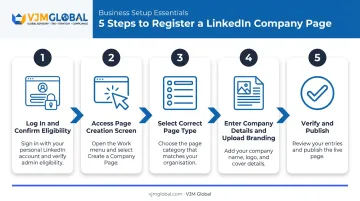
Step 1: Log In and Confirm Eligibility
Sign into your personal LinkedIn account. Before creating anything, search LinkedIn to confirm no existing page already represents your business. LinkedIn rejects duplicate pages, so if one already exists, you'll need to request admin access instead of building a new one.
Step 2: Access the Page Creation Screen
Click the "For Business" icon (sometimes labeled "Work") in the top-right corner of your LinkedIn homepage, then select "Create a Company Page" from the dropdown menu. You can also do this through the LinkedIn iOS app, though page creation isn't currently supported on Android.
Step 3: Select the Correct Page Type
LinkedIn offers three options: Company, Showcase Page, and Educational Institution. Most US businesses should choose "Company." Reserve Showcase Pages for a distinct product line or sub-brand you want to market separately from the main business.
Step 4: Enter Company Details and Upload Branding
Fill in the following details:
- Name and custom LinkedIn URL
- Website address
- Industry, organization size, and organization type
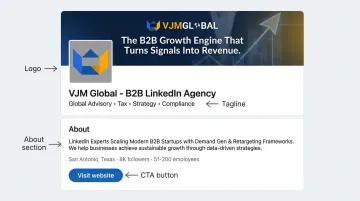
- Logo (a clean, square image works best; check LinkedIn's current upload guidelines since specs can shift)
- Tagline stating clearly what your business does, ideally with a relevant keyword
You can also add your About section, founding year, and phone number at this stage or shortly after publishing.
Step 5: Verify and Publish the Page
Check the box confirming you're authorized to represent the company. This step lets LinkedIn maintain platform integrity and prevents random users from creating pages for businesses they have no connection to.
Click "Create Page." You become the page's Super Admin automatically, with the ability to add other admins afterward.
How to Optimize Your LinkedIn Company Page After Registration
Publishing the page is the easy part. Getting it to actually work for your business takes a bit more effort.
Complete Every Profile Section
LinkedIn's own data shows that pages with complete information receive 30% more weekly views than pages missing key details like the logo, description, or website URL.
Fill out:
- About section (clear, benefit-focused language)
- Specialties (list every relevant service line)
- Location and workplace details
- A call-to-action button, such as "Visit Website" or "Contact Us"
That CTA button matters more than it seems. It's often the single easiest way to convert a page visitor into website traffic.
Word choice matters too. Use relevant keywords naturally in your tagline, About section, and specialties so your page surfaces in both LinkedIn and Google searches. Attaching a small number of relevant hashtags can also help users discover related content and conversations in your industry.
Post Consistently to Build Engagement
Companies that post regularly see stronger results. Hootsuite reports that businesses posting at least once a week see roughly double the engagement compared to those posting sporadically.
Match your frequency to what your team can realistically sustain, whether that's daily or a few times a week. Also encourage employee advocacy. When employees share company updates from their own profiles, they extend your reach far beyond what the page alone can achieve. Their combined networks are typically much larger than your page's follower count.
Common Mistakes and Troubleshooting Registration Issues
Most registration problems trace back to a handful of avoidable errors:
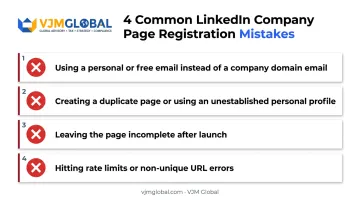
- Using a personal or free email address instead of a company domain email during verification steps
- Trying to create a duplicate page when one already exists, or attempting creation without an active, sufficiently established personal profile
- Leaving the page incomplete after launch, without a logo, tagline, or About section, which suppresses visibility and follower growth
- Hitting creation rate limits or non-unique URL errors, both of which are common and usually fixable by adjusting your requested page name or trying again later
If you run into an error message during creation, clear your browser cache, try a different browser, or check LinkedIn's troubleshooting help center before escalating to support. Most issues resolve without needing to contact LinkedIn directly.
Frequently Asked Questions
Is a company profile on LinkedIn free?
Yes. Creating and maintaining a basic LinkedIn Company Page costs nothing. Premium features like LinkedIn Ads or Recruiter tools carry separate costs if you choose to use them.
Can I create a company LinkedIn account without a personal account?
No. LinkedIn requires an existing personal profile to verify your identity and your authority to represent the business before you can create a page.
What is the 3/2/1 rule on LinkedIn?
It's an unofficial content strategy guideline suggesting a mix of three educational posts, two conversational posts, and one promotional post to keep your content varied.
Can I create a LinkedIn Company Page on a mobile device?
Yes, through the LinkedIn iOS app. Android doesn't support this yet, so desktop remains the most reliable option.
How long does it take for a new LinkedIn Company Page to go live?
Your page publishes as soon as you click "Create Page." Full optimization and any verification-related support issues may take longer to sort out.
What information do I need to register a LinkedIn Company Page for a US business?
An active personal profile, a company domain email, your legal business name and website, industry and size details, and a logo ready for upload.