Google says managing a Business Profile on Maps and Search is available at no charge, which makes this one of the highest-value marketing moves available to any local business. Anyone can complete the setup, whether that's the owner, an admin assistant, or a marketing team member acting as an authorised manager. No technical background is needed.
Where things go wrong is usually avoidable: duplicate listings, failed postcard verification, or half-finished profiles that quietly damage local search rankings. This guide walks through eligibility, the exact registration steps, verification options, and the fixes for the problems UK businesses hit most often.
Key Takeaways
- Registering on Google Maps via Google Business Profile is free for eligible UK businesses
- You'll need a Google Account, accurate business details, and a valid UK address or service area
- Verification is often done by postcard via Royal Mail, though phone, email, or video options exist
- A complete profile with photos, categories, and reviews boosts local search visibility
- Duplicate listings and address mismatches are the biggest causes of delayed approval
Google Map Registration Guide for UK Businesses
The process follows a fixed sequence: account setup, business information entry, address or service-area definition, category selection, then verification. Each stage feeds into the next, so skipping ahead tends to cause problems later.
Registration itself takes 10-15 minutes. Verification is the variable. If Google assigns instant or phone verification, you could be live the same day. If you're sent a postcard, add another one to two weeks before your profile appears publicly on Maps and Search.
Prerequisites and Eligibility Considerations
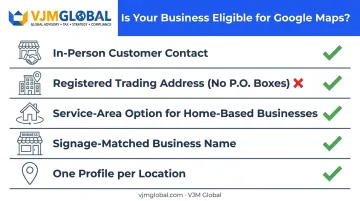
Not every business qualifies for a full Google Business Profile. Google's rule is straightforward: your business must have some form of in-person contact with customers during its stated hours, either at a storefront or by visiting/delivering to them. Online-only businesses, brands without direct customer contact, and lead-generation agents don't qualify.
For UK businesses, the address requirements carry a few specific catches:
- You need a registered office or genuine trading address, not a P.O. box or unstaffed virtual office
- Sole traders and home-based businesses can use the service-area setting to hide their home address while still listing the areas they cover
- Co-working spaces are acceptable only if the business has visible signage and its own staff present
Google also enforces two non-negotiables: your business name must match what's on your actual signage and branding (no keyword-stuffed names like "Smith Plumbing Emergency 24/7 London"), and only one profile is permitted per business location. Creating a second listing to "test" something almost always backfires.
Information You'll Need Before You Start
Before opening the sign-up form, gather these details so you're not hunting for them mid-registration:
- Exact business name (matching your signage)
- Primary category from Google's approved list, plus any relevant secondary categories
- UK phone number and website
- Precise address, or a defined service-area radius
- Opening hours, including bank holiday adjustments
Optional but valuable additions include a business description, relevant attributes (wheelchair accessible, outdoor seating, and similar), and a set of photos. None of this requires specialist software. You just need a Google Account and a way to receive your verification code, whether that's post, phone, or email.
How to Register Your Business on Google Maps (Step-by-Step)
Google Business Profile Manager runs through a fixed sequence. Rushing through it, particularly the address and category fields, is one of the main reasons UK listings fail verification or end up duplicated.
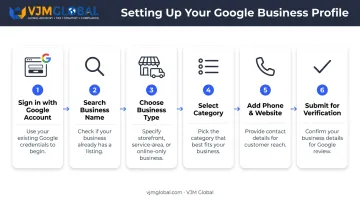
- Sign in with a Google Account (or create one) and go to google.com/business.
- Search for your business name first. This checks whether an old customer or previous tenant has already created a listing for your location. Skipping this step is the single biggest cause of duplicate profiles.
- Choose your business type. Select storefront if customers visit you, or service-area business if you travel to them, then enter the matching address or service region.
- Select your primary category carefully, then add secondary categories where relevant. Google's category list is fixed. You can't invent one, so pick the closest accurate match rather than the most flattering one.
- Add your UK phone number and website, then choose from whichever verification method Google offers your business.
- Submit for verification and review.
Category tip: Category choice has an outsized effect on which searches you appear for. A café listed under "restaurant" instead of "coffee shop" will miss a chunk of relevant local searches, even with an otherwise perfect profile.
Verifying Your Business and Post-Registration Checks
Verification exists to confirm that whoever's managing the listing is genuinely authorised to represent the business, before it goes public on Maps and Search. Google decides which method you're offered. You can't pick your preferred one.
Postcard verification remains the most common route for UK businesses. A code arrives by post to your listed address, which you then enter into Business Profile Manager.
Google's current guidance is that most mailed codes arrive within 14 days, with review taking up to five working days after you submit the code. Some profiles verify instantly, but that's not something you can request.
Alternative methods, offered depending on your business category and information on file, include:
- Phone or text verification (often near-instant)
- Email verification
- Video verification, useful for businesses without permanent signage, such as mobile services
Once verified, run a few post-registration checks before assuming the job is done:
- Confirm the map pin sits on your actual location, not somewhere down the street
- Check that opening hours display correctly, including any bank holiday exceptions
- Verify your category and attributes appear as intended
Skipping these checks carries real consequences. An incorrect map pin or an unverified profile pushes you down in "near me" search results, and a wrong pin location has a direct, physical cost: it sends customers to the wrong door.
Common Registration Problems and Fixes
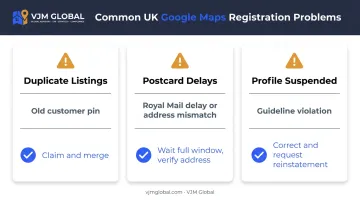
UK businesses most often run into three issues: duplicate listings, delayed postcards, and profiles that get suspended shortly after going live. Each has a predictable cause and a clear fix.
Duplicate or Conflicting Listings
The problem: two or more listings appear for the same business.
Likely cause: a past customer created a pin before you registered, or a previous business at your address was never removed from Maps.
The fix: search Maps for existing listings before creating a new one. If a duplicate already exists, claim it through Google's "Claim this business" option rather than adding another, then use Google's duplicate-reporting process to merge or remove the extra listing.
Postcard Verification Delayed or Lost
The problem: the verification postcard never arrives, or turns up after the request has expired.
Likely cause: Royal Mail delivery delays, or an address that doesn't precisely match UK postcode formatting.
The fix: wait the full window before requesting a new code, since ordering another postcard invalidates the one already in transit. Double-check that your address matches your official records exactly, and switch to phone or email verification if Google offers it as an alternative.
Profile Suspended or Disabled
The problem: your listing disappears from Maps shortly after going live.
Likely cause: guideline violations such as a keyword-stuffed business name, a mismatched category, or address details that don't align with public records.
The fix: review Google's Business Profile guidelines, correct whatever's flagged, and submit a reinstatement request through Business Profile Manager. Don't create a second profile while the appeal is pending. It only adds a duplicate-listing problem on top of the suspension.
Pro Tips for UK Businesses to Maximise Visibility
Registration gets you on the map. Maintenance is what keeps you visible.
Three habits drive the biggest visibility gains:
- Complete every field. Profiles with 100+ photos generate 520% more calls and 2,717% more direction requests than average, according to BrightLocal's analysis of 45,000+ businesses.
- Stay active. Regular posts and prompt review replies signal to both customers and Google's algorithm that the business is genuinely operating, not just listed.
- Keep your details identical everywhere. Match your business name, address, and phone number exactly across your website, Companies House record, and other directories. Inconsistent data across platforms is a quiet but real ranking penalty.
This matters even more once you expand beyond the UK. Businesses entering markets like India often see their listing accuracy slip as company details diverge across jurisdictions.
VJM Global's business setup and compliance specialists help UK companies keep entity registration details consistent between UK and Indian filings. That same discipline for legal registrations also keeps your business listings accurate wherever you operate.
Ongoing upkeep, not the initial 15-minute setup, is what determines whether your listing stays visible six months from now.
Frequently Asked Questions
Is it free to put my business on Google Maps?
Yes, registering and verifying a Business Profile is completely free. Costs only arise if you choose to run Google Ads or other paid promotions alongside your listing.
How long does Google Maps verification take for a UK business?
Postcard verification usually takes up to 14 days via Royal Mail, plus review time. Phone, email, or video verification, where available, can be near-instant.
Can I register a business on Google Maps without a physical address?
Yes. Service-area businesses can hide their address entirely and define a service region instead, which suits mobile or home-based businesses.
Do sole traders need a registered business address to use Google Maps?
No. Sole traders can register using a home address kept hidden as a service-area business, or a commercial address if they have one.
What happens if my business already appears on Google Maps?
Search for the existing listing and use "Claim this business" rather than creating a new one, since a duplicate listing only creates extra work to clean up later.
How do I update my business information after registering?
Verified owners can edit details anytime through Business Profile Manager. Significant changes, particularly to the business name, may trigger a re-verification process.