
Individual taxpayers can often register using nothing more than Aadhaar-linked OTP. Companies don't get that shortcut. Company registration requires a Digital Signature Certificate and a verified Principal Contact whose details line up with official records, and that's exactly where many first-time filers get stuck.
This guide walks through what you need before you start, the actual registration steps, mistakes that trip people up, fixes for common errors, and what happens once you're in.
Key Takeaways
- Registration requires an active company PAN, a valid Class 3 DSC, and a Principal Contact with matching details
- The online process takes 15–20 minutes, but DSC setup and data mismatches cause most delays
- This is just step one: DSC linking, adding a CA, and return filing follow right after
- Foreign-owned companies often need professional support to avoid rejected applications
What You Need Before Registering for e-Filing Company Services
Incomplete or mismatched documentation is the single biggest reason company e-Filing registrations stall out or get rejected. Get these four things sorted first, and the actual registration takes minutes.
Company PAN and Incorporation Details
Your company needs an active PAN, which the Income Tax Department typically allots automatically during SPICe+ incorporation. Before you start, confirm your CIN, incorporation date, and company name are entered exactly as they appear on your incorporation certificate. The portal auto-fetches some of this from PAN records, so any discrepancy at the source will follow you into the registration form.
Digital Signature Certificate (DSC) of the Authorised Signatory
Unlike individuals, who can rely on OTP-based verification, companies must file and register under a Class 3 DSC issued in the name of a director or authorised signatory. This certificate must be:
- Active and unexpired
- Issued by a Certifying Authority licensed under the Information Technology Act
- Linked to the same PAN as the Principal Contact
Principal Contact / Authorised Signatory Details
The person acting as Principal Contact needs to provide:
- PAN (already registered on the e-Filing portal)
- DIN, if they're a director
- Designation within the company
- A primary mobile number and email address
Access to Registered Mobile and Email
The signatory must have live access to both the mobile number and email entered during registration. The portal sends separate OTPs to each, so a shared inbox or an old number someone forgot to update will block you at the verification step.
Foreign and NRI-led companies often run into snags here simply because directors are overseas and documentation takes longer to assemble. VJM Global works with these clients to gather and verify PAN, DSC, and contact details before submission, which cuts down on avoidable rejections.
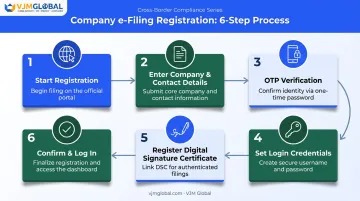
How to Register for e-Filing Company Services in India
Once your documentation is in order, the registration itself is straightforward. Here's the full sequence.
- Start registration on the portal. Go to incometax.gov.in, click "Register," and select "Company" under the "Other than Individual" category. Enter the company PAN and click Validate. An invalid or already-registered PAN throws an error immediately.
- Enter company and Principal Contact details. Confirm the auto-fetched organization name, incorporation date, and company type, then add the Principal Contact's mobile number, email, and postal address.
- Complete OTP verification. You'll get a 6-digit OTP on mobile and another on email, each valid for 15 minutes with three attempts allowed. Use "Resend OTP" if either doesn't arrive.
- Set login credentials. Create a password of 8–14 characters with at least one uppercase letter, one lowercase letter, a number, and a special character. The company PAN becomes your permanent user ID.
- Register the Digital Signature Certificate. After logging in, go to My Profile > Register DSC, install the emBridge signing utility, and connect the DSC token. Sign to complete registration. This step is required before filing any return.
- Confirm and log in. Save the acknowledgment and log back in to access the company dashboard, where you can add representatives or begin filing.
Common Mistakes to Avoid During Registration
Most rejected applications trace back to one of these three errors:
- Selecting "Individual" instead of "Company." This creates an incorrect profile type and forces you to start over from scratch.
- Entering Principal Contact details that don't match DIN or MCA records. Even a minor typo in a name or designation can cause verification to fail.
- Attempting registration with an expired or improperly linked DSC. The certificate must be active and correctly matched to the signatory's PAN, not just installed on the device.
None of these are complicated to fix, but they're easy to overlook when you're rushing through the form.
Troubleshooting Common Registration Issues
Most registration problems come down to data mismatches or technical setup, not the process itself.
| Issue | Likely Cause | What to Check |
|---|---|---|
| OTP not received | Outdated mobile/email on file | Confirm the Principal Contact's details are current before retrying |
| DSC registration fails | emBridge utility not installed or browser incompatibility | Reinstall emBridge, update Chrome or Edge, and confirm the token driver is active |
| "PAN already registered" error | A previous CA or director already created a profile | Use "Forgot Password" on the existing account, or contact the current profile holder for access |
If none of these resolve the problem, the Income Tax helpdesk (1800 103 0025 or 1800 419 0025) can escalate account-specific issues directly. For overseas founders managing this remotely, working with a firm like VJM Global can resolve these issues faster.
What to Do After Registering for e-Filing Company Services
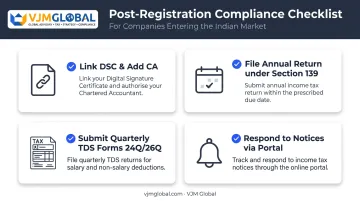
Registration is only the first step. A few things need immediate attention:
- Link the DSC to your profile and add an authorized representative, such as a Chartered Accountant, through the "My CA" service so they can prepare and submit filings on the company's behalf.
- File the annual return under Section 139 of the Income Tax Act and track its due date closely.
- Submit quarterly TDS statements on Forms 24Q and 26Q. Under Rule 31A, these are due by the end of the month following each quarter.
- Respond to notices promptly through the portal rather than by post — the system logs everything against the company's PAN.
For foreign-owned or NRI/OCI-promoted companies unfamiliar with Indian procedures, VJM Global handles end-to-end e-Filing registration, DSC setup, and ongoing tax compliance as part of its broader business setup and advisory services in India.
Frequently Asked Questions
What is e-Filing?
E-Filing is the process of electronically submitting income tax returns, TDS (Tax Deducted at Source) returns, and related documents through the Income Tax Department's online portal instead of paper filing.
Is a Digital Signature Certificate mandatory for company registration on the e-Filing portal?
Yes. All companies must register and file using a valid Class 3 DSC of an authorised signatory. Individuals can use OTP verification instead, but companies cannot.
Can a foreign company register for e-Filing in India without a PAN?
No. An active company PAN is mandatory and must be obtained, usually during SPICe+ incorporation, before e-Filing registration can begin.
Who should be the Principal Contact for a company on the e-Filing portal?
It should be a director or authorised signatory whose PAN, DIN, and contact details match official records exactly, since mismatches are a common cause of verification failure.
What happens if my company's DSC expires after registration?
An expired DSC blocks return filing until you obtain a new one and register it on the portal. Track expiry dates well in advance to avoid last-minute filing delays.
How long does it take to register a company on the Income Tax e-Filing portal?
The online process itself takes roughly 15–20 minutes. Delays usually come from DSC setup issues or mismatches with MCA and PAN records, not the registration steps themselves.