Introduction
TripAdvisor remains one of the most influential platforms in hospitality. Millions of travelers scan restaurant, hotel, and attraction listings before they ever pick up the phone or click "book now."
Many US business owners assume getting listed is a one-click process. It isn't. Incomplete registration, mismatched business details, or a skipped verification step can stall your listing for weeks, or worse, leave you with a duplicate page that splits your reviews.
This guide walks through the exact registration steps for US businesses, what to prepare beforehand, and the ranking factors that matter once you're live. It also covers the mistakes that trip up first-time owners.
TL;DR
- Registering is free and the form takes under 15 minutes to complete
- Search for an existing listing first; guests often list businesses before you do
- Accurate NAP (Name, Address, Phone) info and verified ownership speed up approval
- Ranking depends on review quality, quantity, recency, and your response rate
- Paid tools like Business Advantage are optional, never required for a working listing
How to Register Your Business on TripAdvisor (Step-by-Step)
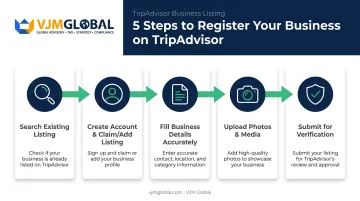
Step 1: Search to Confirm Your Business Isn't Already Listed
Before doing anything else, head to TripAdvisor's owner page and search your exact business name. Guests, employees, or even a local blogger can create a listing on your behalf without you knowing.
- If a listing appears: move straight to claiming it (Step 2)
- If nothing appears: proceed to create a new listing through the "Add a Place" form
Skipping this step is the single biggest cause of duplicate listings. Duplicates split your reviews across two pages, dilute your rating, and confuse travelers comparing options.
Step 2: Create a TripAdvisor Account and Claim or Add Your Listing
You'll need an account to access the Management Center. Sign up with email, Google, or Facebook.
From there:
- Click "Claim Listing" if your business already has a page
- Click "Add a Missing Place" if it doesn't, then select the correct category: hotel, restaurant, attraction, or vacation rental
Vacation rental owners should note that TripAdvisor runs a separate registration flow for rentals rather than the standard three-category form used for accommodations, restaurants, and things to do.
Whichever path you take, this account becomes your long-term hub for managing reviews, photos, and updates, so use an email you check regularly.
Step 3: Fill in Your Business Details Accurately
Use your official registered business name exactly as it appears everywhere else online. No keyword stuffing, no promotional additions like "Best Pizza in Town." TripAdvisor flags and rejects listings that read like ads rather than business names.
Next:
- Enter your full US street address and drop an accurate map pin
- Match your phone, email, and website to what's listed on Google Business Profile and your own site
- Check every applicable amenity box (parking, Wi-Fi, wheelchair access, outdoor seating, and so on)
- Write a factual, specific description of what you offer, not generic marketing copy
Step 4: Upload High-Quality Photos and Media
TripAdvisor doesn't publish a universal minimum photo count for new listings, so don't get hung up on hitting a magic number. Instead, aim for a solid mix:
- Capture exterior shots so travelers recognize your storefront
- Show interior shots of dining rooms, lobbies, or common areas
- Include rooms, products, or menu items depending on your category
- Highlight amenities and nearby attractions
Images need to be original, family-friendly, and free of logos or promotional overlays. Restaurant owners can upload up to 50 photos in a single batch, and those photos typically appear within about 24 hours of upload.
Step 5: Submit for Review and Complete Ownership Verification
Once submitted, TripAdvisor verifies your connection to the business, usually through a government-issued photo ID plus a face-verification photo, or a call to your listed business phone.
Verification speed depends on your situation: claims on existing listings with approved ID checks can grant access within minutes, while cases needing extra review typically hear back by email within 72 hours.
TripAdvisor doesn't publish an official approval window for brand-new listings, so build in some buffer time rather than expecting instant access. Once verified, you'll unlock:
- The ability to respond to reviews publicly
- Full editing rights over your listing details
- Access to the Management Center dashboard for performance tracking
What You Need Before Registering Your Business on TripAdvisor
Incomplete preparation is the most common reason approvals stall or get rejected. Gather everything below before you open the form.
Business Information & Registration Readiness
Have these on hand:
- Your official registered business name
- Physical US address and active phone number
- A monitored business email
- Business license or EIN details, in case TripAdvisor's review team requests supporting documentation
Businesses that are properly registered and compliant domestically tend to sail through verification faster. Keeping your EIN, business license, and TripAdvisor application details consistent prevents mismatches that trigger manual review delays. Double-check that your business name and address match exactly across every document before you submit.
Visual and Descriptive Assets
Don't write your description or hunt for photos while the form is open. Prepare in advance:
- 5-10 high-resolution photos spanning your categories (exterior, interior, product, amenities)
- A factual, specific business description drafted ahead of time, not typed under pressure
- Your primary business category selected in advance, such as restaurant, hotel, or attraction
Ownership Verification Documents
Have the verifying person's full name, their role (owner or manager), and a personal monitored email or phone number ready. TripAdvisor uses these details to confirm you actually have authority over the listing.
Key Factors That Affect Your TripAdvisor Ranking After Registration
Registration gets you visible. What happens next depends on TripAdvisor's Popularity Ranking algorithm, which recalculates daily and determines how prominently your business shows up in search results.
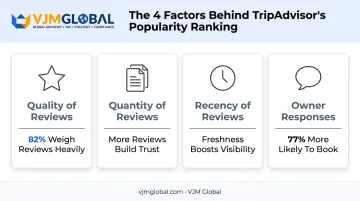
Quality of Reviews
Why it matters: Detailed, positive reviews signal reliable service to both travelers and the algorithm itself. Higher ratings carry more weight than lower ones.
Impact on results: Reviews influence booking decisions more than most owners realize. A global consumer survey found that 82% of travelers consider reviews extremely important when choosing accommodations, with 77% saying the same for attractions and 70% for restaurants.
Quantity of Reviews
Why it matters: More reviews build statistical credibility. A single bad review barely dents a listing with 300 reviews; it can sink one with only five.
Impact on results: Simple collection tactics work best: ask at checkout, or send a short follow-up email a day or two after the visit. Quantity alone won't guarantee a higher rank than a competitor, but it does give the algorithm more confidence in your average score.
Recency of Reviews
Why it matters: Older reviews carry less algorithmic weight over time because they represent an experience that may no longer reflect current service.
Impact on results: A steady trickle of new reviews outperforms a large batch collected once and never repeated. Build review requests into your regular customer workflow instead of running one-off campaigns.
Owner Responses to Reviews
Why it matters: Responding to reviews doesn't directly move your Popularity Ranking score, but it strongly shapes traveler trust and booking behavior.
Impact on results: An Ipsos MORI study of over 23,000 TripAdvisor users found 77% were more likely to book after seeing a personalized owner response. Another 63% were more likely to book when owners responded to most reviews, not just the negative ones.
Common Mistakes to Avoid When Registering on TripAdvisor
Each mistake below is common and easy to fix once you spot it.
- Creating a duplicate listing instead of claiming an existing one splits reviews and confuses travelers. Request a listing merge through TripAdvisor owner support to fix it.
- Submitting inconsistent NAP details across platforms erodes trust. Audit TripAdvisor, Google Business Profile, and your website for exact matches, including abbreviations like "St." versus "Street."
- Uploading non-compliant photos or picking the wrong category (watermarks, text overlays, low resolution) can trigger rejection. Review image requirements and category settings in the Management Center before resubmitting.
TripAdvisor Listing Costs for US Businesses: Free vs Paid Options
The base TripAdvisor listing costs $0. Reviews, photos, and owner responses all come standard, no subscription required.
Beyond the free tier, a few paid products exist for businesses that want extra visibility:
| Product | What it does | Pricing model |
|---|---|---|
| Business Advantage | Enhanced content, featured reviews, photo/video tools | No published fixed price; contact TripAdvisor for a quote |
| Sponsored Placements | Boosts visibility in search results | Cost-per-click, with three preset monthly budgets or a custom amount |
| Instant Booking | Let travelers book directly on TripAdvisor | Being discontinued; check current availability before planning around it |
None of these paid tools affect your Popularity Ranking directly. TripAdvisor is explicit that advertising relationships don't influence organic rank.
Most US businesses can start with the free listing alone. Track your review volume and photo engagement for a few months before committing budget to Business Advantage or Sponsored Placements — that data will tell you where paid tools are actually worth the spend.
Frequently Asked Questions
Can you make money on TripAdvisor?
TripAdvisor doesn't pay businesses directly. However, a strong listing with quality reviews drives more direct bookings, and paid tools can help capture reservations through the platform itself.
Is it free to register a business on TripAdvisor?
Yes. The base listing is completely free for US businesses. Paid upgrades exist for enhanced visibility, but they're optional add-ons, not requirements.
How long does TripAdvisor approval take for a US business?
Claim verification on an existing listing can take minutes to 72 hours. Brand-new listings don't have a published timeframe, so lesser-known businesses should expect it to take longer than an established brand with existing online presence.
What happens if my business is already listed by someone else?
Search for it at tripadvisor.com/Owners, select the listing, and click "Claim Listing." Ownership verification (photo ID or phone call) determines control, not who originally created the page.
Do I need a business license or EIN to register on TripAdvisor?
Not as a standard requirement. TripAdvisor primarily verifies address and contact details, but having your registration documents ready speeds things up if the review team asks for them.
Can a US business expanding internationally also benefit from a TripAdvisor listing?
Yes. Businesses with multiple locations, including those expanding internationally, can maintain a separate verified listing for each address, ensuring local reviews and details stay accurate wherever they operate.