Introduction
When reconciling transactions in Xero, knowing which nominal code to assign is rarely obvious. Yet that single decision affects VAT submissions, Profit & Loss accuracy, and Corporation Tax computations filed with HMRC.
Xero supports the financial operations of 440,000 UK small businesses—nearly one-third of its global customer base. The chart of accounts, with its nominal codes, is the backbone of every transaction recorded in the system.
The consequences of getting it wrong run deeper than messy reports. HMRC estimates the UK VAT gap at 6.5% (£11.9 billion) for the 2024 to 2025 tax year—up from 5% the previous year. Poor record keeping is the single biggest cause of VAT return problems for small businesses, according to AAT.
This guide cuts through the confusion. It covers what UK Xero chart of accounts codes are, what each code range means, which codes are specific to UK compliance, and how to use and customise them correctly.
Key Takeaways
- Xero's chart of accounts is a structured list of financial accounts used to categorise transactions, each identified by a numeric nominal code
- UK code ranges: 200s for revenue, 400s–500s for expenses, 600s–700s for assets, 800s–900s for liabilities, 950+ for equity
- UK-specific codes include 820 (VAT), 825 (PAYE Payable), 826 (NIC Payable), 830 (Corporation Tax), 835 (Directors' Loan)
- Add custom codes via Accounting → Chart of Accounts → Add Account
- Correct codes and VAT treatment on every transaction are essential for clean HMRC filings and accurate reporting
What Is the Xero Chart of Accounts and How Do Codes Work?
The chart of accounts (COA) is the master list of every account category a business uses to record financial activity—assets, liabilities, equity, revenue, and expenses. In Xero, each account is assigned a nominal code (also called an account code), which is a numeric shorthand used when reconciling transactions or creating journal entries.
Xero's UK default COA is pre-populated with standard nominal codes aligned to UK accounting conventions and VAT requirements, so you can start using it without any initial setup. It's also fully customisable to fit any business structure or reporting need.
Before diving deeper, it helps to clarify a few terms you'll encounter throughout Xero:
- The chart of accounts is the complete list of all your accounts in one place
- Nominal codes and account codes are used interchangeably — "nominal code" is the traditional UK term, while Xero's interface uses "account code"
- Each code determines where a transaction appears in your Profit & Loss statement, Balance Sheet, and VAT returns
Understanding UK Nominal Code Ranges in Xero
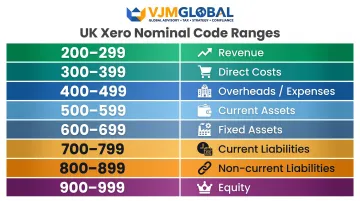
UK Xero nominal codes follow a logical banded structure where the numeric range signals the account type. Understanding this structure helps you instantly recognise what category any code belongs to without memorising each one.
UK Nominal Code Range Breakdown
| Range | Category |
|---|---|
| 200–299 | Revenue (Income) |
| 310–325 | Direct Costs |
| 400–500 | Overheads / Expenses |
| 610–630 | Current Assets |
| 710–771 | Fixed Assets |
| 800–877 | Current Liabilities |
| 900–920 | Non-current Liabilities |
| 950–980 | Equity |
UK vs US Code Differences
The UK code ranges differ meaningfully from the US default (where assets start at 1200+ and expenses at 8100+). If you've migrated from a US Xero account or imported a non-UK template, your codes may fall outside standard UK banding—this causes reporting confusion and should be corrected.
Default VAT Treatment per Nominal Code
Beyond the range structure, each account in Xero UK carries a default VAT treatment that connects directly to how transactions are coded:
- 20% VAT on Income
- 20% VAT on Expenses
- 5% VAT on Expenses
- Exempt
- No VAT
This default auto-populates when you select the code during reconciliation but can be overridden on individual transactions.
Assigning the wrong nominal code can miscalculate VAT submissions to HMRC and misstate Corporation Tax computations. Code selection is a compliance matter — treat it accordingly.
Complete Xero Chart of Accounts Code List for UK
This section provides a practical reference for the most commonly used UK nominal codes, organised by category.
Revenue Codes (200–270)
| Code | Account Name | Account Type | Default VAT |
|---|---|---|---|
| 200 | Sales | Revenue | 20% VAT on Income |
| 260 | Other Revenue | Revenue | 20% VAT on Income |
| 270 | Interest Income | Revenue | No VAT |
200 is for standard trading income (your core business sales). 260 is for non-recurring, non-trading income such as asset sales, grants, or one-off miscellaneous receipts.
Direct Cost Codes (310–325)
| Code | Account Name | Account Type | Default VAT |
|---|---|---|---|
| 310 | Cost of Goods Sold | Direct Cost | 20% VAT on Expenses |
| 320 | Direct Wages | Direct Cost | No VAT |
| 321 | Subcontractors | Direct Cost | 20% VAT on Expenses |
| 325 | Direct Expenses | Direct Cost | 20% VAT on Expenses |
Code 320 covers staff costs directly tied to delivering a product or service, such as production labour. Code 477 (Salaries) is for general employee overhead — such as office staff, admin, and management.
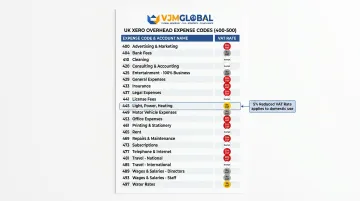
Overhead / Expense Codes (400–500)
| Code | Account Name | Account Type | Default VAT |
|---|---|---|---|
| 400 | Advertising & Marketing | Expense | 20% VAT on Expenses |
| 401 | Audit & Accountancy Fees | Expense | 20% VAT on Expenses |
| 404 | Bank Fees | Expense | No VAT |
| 416 | Depreciation Expense | Expense | No VAT |
| 429 | General Expenses | Expense | 20% VAT on Expenses |
| 441 | Legal Expenses | Expense | 20% VAT on Expenses |
| 445 | Light, Power, Heating | Expense | 5% VAT on Expenses |
| 461 | Printing & Stationery | Expense | 20% VAT on Expenses |
| 469 | Rent | Expense | 20% VAT on Expenses |
| 473 | Repairs & Maintenance | Expense | 20% VAT on Expenses |
| 477 | Salaries | Expense | No VAT |
| 479 | Employers National Insurance | Expense | No VAT |
| 489 | Telephone & Internet | Expense | 20% VAT on Expenses |
| 493 | Travel – National | Expense | 20% VAT on Expenses |
| 500 | Corporation Tax | Expense | No VAT |
Code 445 carries the reduced 5% VAT rate for domestic fuel and power supplies, as confirmed by HMRC VAT Notice 701/19. Applying the standard 20% rate here is a common filing error.
Asset Codes (610–771)
Current Assets (610–630)
| Code | Account Name | Account Type | Default VAT |
|---|---|---|---|
| 610 | Accounts Receivable | Current Asset | No VAT |
| 620 | Prepayments | Current Asset | No VAT |
| 630 | Inventory | Current Asset | No VAT |
Fixed Assets (710–771)
Fixed assets use a paired structure: every asset code has a matching accumulated depreciation code that reduces its net book value on the Balance Sheet.
| Asset Code | Asset Name | Depreciation Code | Depreciation Name |
|---|---|---|---|
| 710 | Office Equipment | 711 | Less Accumulated Depreciation on Office Equipment |
| 720 | Computer Equipment | 721 | Less Accumulated Depreciation on Computer Equipment |
| 760 | Motor Vehicles | 761 | Less Accumulated Depreciation on Motor Vehicles |
| 764 | Plant & Machinery | 765 | Less Accumulated Depreciation on Plant and Machinery |
| 770 | Intangibles | 771 | Less Accumulated Amortisation on Intangibles |
All fixed asset acquisition codes default to 20% VAT on Expenses. All accumulated depreciation codes default to No VAT.
Liability and Equity Codes (800–980)
Current Liabilities (800–877)
| Code | Account Name | Account Type | Default VAT |
|---|---|---|---|
| 800 | Accounts Payable | Current Liability | No VAT |
| 805 | Accruals | Current Liability | No VAT |
| 811 | Credit Card Control Account | Current Liability | No VAT |
| 814 | Wages Payable – Payroll | Current Liability | No VAT |
| 820 | VAT | Current Liability | No VAT |
| 825 | PAYE Payable | Current Liability | No VAT |
| 826 | NIC Payable | Current Liability | No VAT |
| 830 | Provision for Corporation Tax | Current Liability | No VAT |
| 835 | Directors' Loan Account | Current Liability | No VAT |
| 850 | Suspense | Current Liability | No VAT |
Codes 820–835 cover your key statutory and payroll liabilities — VAT, PAYE, NIC, corporation tax provisions, and directors' loan accounts. These should never be coded to expense accounts.
Non-current Liabilities (900–920)
| Code | Account Name | Account Type | Default VAT |
|---|---|---|---|
| 900 | Loan | Non-current Liability | No VAT |
| 910 | Hire Purchase Loan | Non-current Liability | No VAT |
Equity (950–980)
| Code | Account Name | Account Type | Default VAT |
|---|---|---|---|
| 950 | Share Capital | Equity | No VAT |
| 960 | Retained Earnings | Equity | No VAT |
| 970 | Owner Funds Introduced | Equity | No VAT |
| 980 | Owner Drawings | Equity | No VAT |
UK-Specific Codes You Need to Know
Several nominal codes in the UK default chart of accounts exist specifically because of HMRC's reporting and compliance framework. They have no direct equivalent in US or Australian Xero defaults and are critical for UK businesses to use correctly.
Code 820 – VAT
This is the single account Xero uses to track all VAT collected on sales and reclaimed on purchases. According to Xero Central, Xero has one VAT account per organisation and only includes transactions from this account in the VAT return.
Critical rules:
- Never manually adjust code 820
- At the end of each VAT period, any payment to or refund from HMRC is coded here
- Do not create additional VAT accounts—they won't be included in VAT return calculations
Payroll Codes – 825, 826, 814
These three codes work together in payroll journal entries and must not be confused with general salary expense code 477:
- 825 (PAYE Payable): Income tax deducted from employee wages, due to HMRC
- 826 (NIC Payable): Employer's National Insurance contribution due to HMRC
- 814 (Wages Payable – Payroll): Net wages owed to employees before payment
These liabilities must be tracked separately between payroll processing and HMRC payment dates — the gap is where reconciliation errors most often occur.
Code 835 – Directors' Loan Account
This code is unique to UK limited companies and tracks money loaned to or from directors outside of their salary or dividend.
Overdrawn balances trigger Corporation Tax consequences under HMRC's S455 charge. Key rules to keep in mind:
- 9-month repayment window: If a director owes the company money and hasn't repaid by 9 months after the Corporation Tax accounting period ends, the S455 charge applies
- S455 rate: The company must pay Corporation Tax at 33.75% of the outstanding amount (32.5% for loans made before 6 April 2022)
Reconcile code 835 at least quarterly — catching an overdrawn balance early leaves time to repay before the S455 deadline triggers.
How to Customise Your Xero Chart of Accounts
When to Add a Custom Code
Add a new code if:
- No existing code clearly describes a transaction type
- You need to track a specific expense category separately for management reporting (e.g., splitting 489 Telephone & Internet into separate mobile and broadband codes)
Always check existing codes first to avoid duplication.
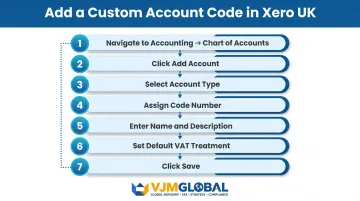
Step-by-Step Process
- Navigate to Accounting → Chart of Accounts
- Click Add Account
- Select Account Type (Revenue, Expense, Asset, Liability, Equity)
- Assign a Code number following the logical range for that type
- Enter a Name and optional Description
- Set the default VAT treatment
- Click Save
New codes become available immediately for reconciliation (you may need to refresh the screen).
When to Seek Professional Help
Some situations call for a more structured review rather than ad-hoc additions. Consider working with an accounting partner if:
- Your business has multiple revenue streams, departments, or trading sites
- You're migrating from another accounting system (Sage, QuickBooks, etc.)
- Your current COA makes management reporting difficult to interpret
- You're unsure whether your structure meets HMRC compliance requirements
VJM Global has supported 250+ UK businesses in designing Xero COA structures that align with both management reporting needs and HMRC obligations.
Best Practices for Using Xero Chart of Accounts Codes
Keep the Code List Lean
Resist the temptation to create a new code for every minor variation. A bloated chart of accounts makes reconciliation slower and financial reports harder to read. Use code 429 (General Expenses) as a catch-all only sparingly, and consolidate similar spend into the most appropriate existing code.
Apply Consistent VAT Treatment
The most common error in UK Xero accounts is applying 20% VAT to codes that should carry No VAT or Exempt treatment. Common mistakes include:
- Bank charges at 404 (should be No VAT)
- Salaries at 477 (should be No VAT)
- Insurance at 433 (should be Exempt)
- Light, power, heating at 445 (should be 5% VAT, not 20%)
Always verify the default VAT rate on any unfamiliar code before saving a reconciliation.
Review Control Accounts Regularly
These codes act as control accounts and need regular reconciliation against HMRC statements and payroll records:
- 820 — VAT
- 825 — PAYE Payable
- 826 — NIC Payable
- 835 — Directors' Loan Account
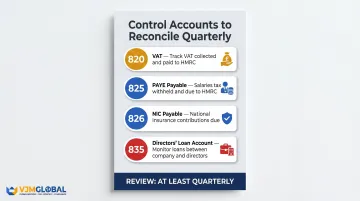
Review each at least quarterly to catch mispostings before they compound into larger discrepancies at year-end.
Frequently Asked Questions
What is the Xero chart of accounts and codes?
The Xero chart of accounts is a complete list of all financial account categories used to record and classify business transactions. Each account is identified by a nominal code, a numeric identifier that determines where a transaction appears in financial reports.
What do Xero chart of accounts codes mean?
Each code is a numeric shorthand for a specific account category (e.g., 477 = Salaries, 820 = VAT). The number range signals the account type: codes in the 200s are revenue, 400s–500s are expenses, 600s–700s are assets, and 800s–900s are liabilities in the UK default setup.
What is the difference between nominal codes and account codes in Xero?
Nominal code and account code are used interchangeably in Xero — both refer to the numeric identifier assigned to each account. Nominal code is the term favoured in UK accounting, while account code is what Xero's interface displays.
How do I add a custom account code in Xero UK?
Navigate to Accounting → Chart of Accounts → Add Account. Select the account type, enter a code number within the appropriate range, name the account, set the VAT treatment, and save.
Which Xero code should I use for VAT in the UK?
Code 820 is Xero's dedicated VAT account for UK businesses. It automatically tracks VAT collected on sales and reclaimed on purchases and should be used when recording payments to or refunds from HMRC. Creating duplicate VAT accounts will cause reconciliation errors on your VAT return.
What are the UK payroll-specific nominal codes in Xero?
The core payroll codes work together to record a complete payroll journal entry:
- 477 — Salaries (gross pay expense)
- 479 — Employers NIC expense
- 482 — Pension Costs
- 814 — Wages Payable to employees
- 825 — PAYE Payable to HMRC
- 826 — NIC Payable to HMRC