Nearly half of U.S. small business owners say they had little or no financial background before launching their venture. Without solid bookkeeping, even profitable sales can turn into cash-flow problems, missed tax deductions, or audit headaches.
Simple mistakes, such as mixing personal and business expenses or skipping monthly reconciliations, can cost firms thousands of dollars every year.
When your books are organized:
You know exactly what's coming in and going out.
You avoid surprises when tax season arrives.
You make smarter business decisions (pricing, expenses, cash reserves).
You stay audit-ready, reducing stress and the risk of penalties.
That's why "keeping the books" is the foundation of every sustainable business. This blog shows you how to keep accounts for a small business in a clear, practical way.
You'll learn the records to maintain, smart bookkeeping habits, valuable tools, and how to avoid common mistakes. This will give your business a stronger financial foundation from day one.
Quick Glance:
Small businesses don't need complex accounting, but they do need consistent routines. Daily, weekly, and monthly bookkeeping keeps cash flow accurate and tax records clean.
The biggest bookkeeping mistakes are mixing personal and business expenses, poor documentation, and skipped reconciliations - all preventable with simple workflows.
Cash vs. accrual isn't a guess. Choose cash for simplicity; choose accrual if you invoice customers, manage inventory, or want financials that reflect real obligations.
The right software should automate bank feeds, categorization, invoicing, bill tracking, and reconciliation. It reduces errors rather than adding tasks.
If bookkeeping falls behind or becomes overwhelming, outsourcing saves time and prevents IRS issues by keeping your books clean, current, and audit-ready.
What Does "Keeping Accounts" Actually Mean for a Small Business?
Many new business owners think bookkeeping is just saving receipts or checking bank balances. In reality, keeping accounts means tracking every financial activity in a way that stays organized, tax-ready, and easy to analyze.
In the U.S., the IRS expects small businesses to maintain "complete and accurate books" that show income, expenses, assets, and deductions. This requirement is outlined in IRS Publications, which small businesses often overlook.
In simple terms, keeping accounts means maintaining a system that consistently records:
What you owe: loans, credit cards, outstanding supplier invoices
What others owe you: unpaid customer invoices
What you own: cash, equipment, inventory
Proof of every transaction: receipts, invoices, bank statements
It isn't about perfection but consistency. Clean, up-to-date books let you answer questions quickly, like, How much did we earn this month? What do we owe? What can we deduce? Are we running out of cash?
This clarity is what separates businesses that react late from those that stay in control.
What Financial Records a Small Business Must Track?
Small businesses don't need complex accounting to stay compliant. They need a simple rhythm. The IRS requires you to maintain accurate books, but it doesn't tell you how often to update them. That's where most owners slip. A clean cadence removes chaos.
Below is a practical breakdown small-business owners can follow:
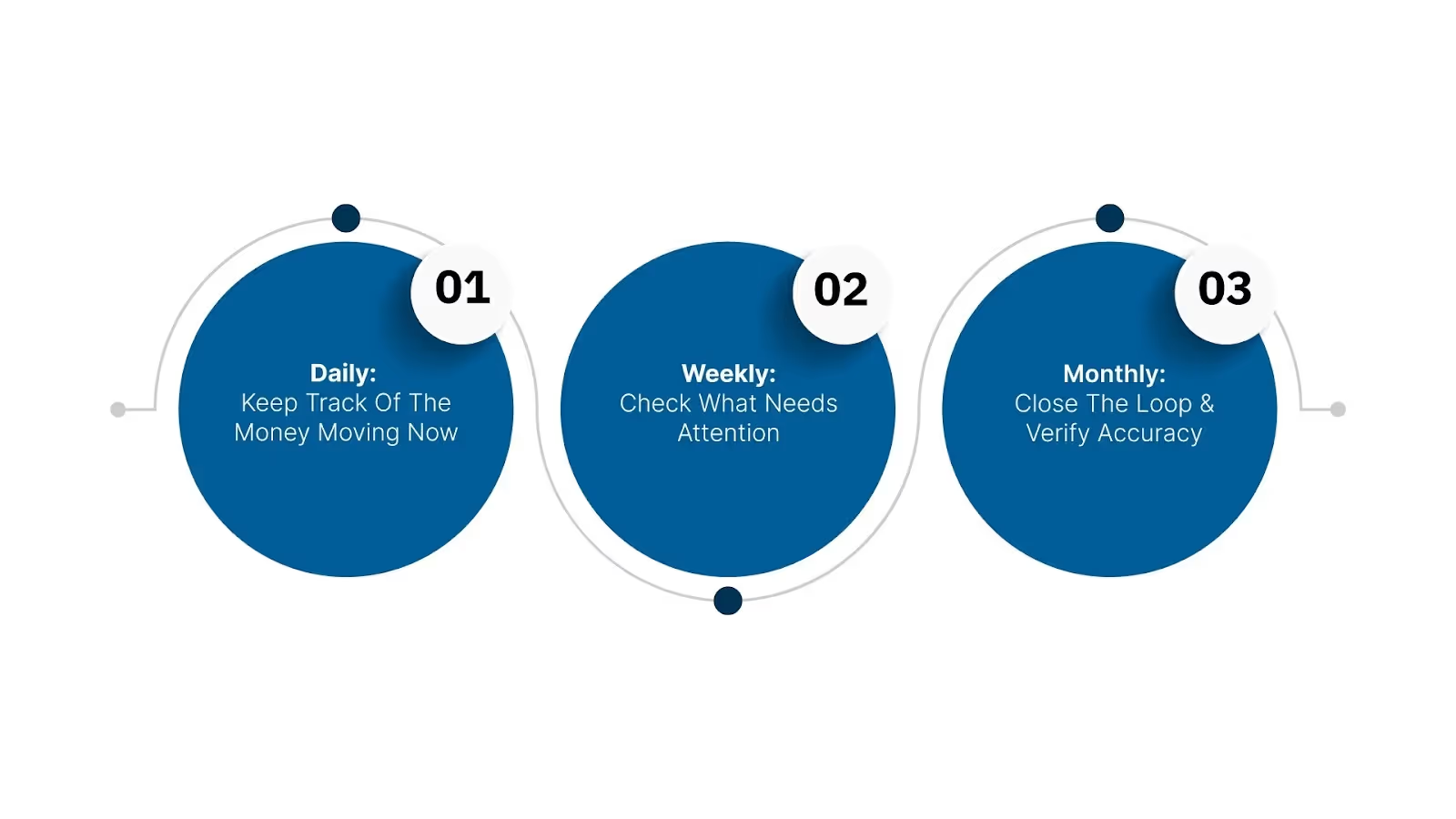
Daily: Keep Track of the Money Moving Now
These tasks prevent lost receipts, missing sales, and confusion later.
Record sales (POS, online, invoices)
Save and categorize receipts
Update cash transactions
Log customer payments
Many IRS errors stem from missing day-to-day documentation, especially for cash-heavy businesses.
Weekly: Check What Needs Attention
Weekly reviews keep your cash flow stable.
Review unpaid customer invoices
Pay upcoming bills or schedule payments
Match bank activity to your books (bank feed checks)
Track employee hours if you run payroll
This is where many businesses discover late payments or overlooked expenses that distort profitability.
Monthly: Close the Loop & Verify Accuracy
Monthly updates give you a clear financial picture and prepare you for taxes.
Bank reconciliation (one of the most important steps)
This monthly discipline is what lenders, investors, and the IRS expect to see if they review your books.
Record retention isn't optional; it's part of being audit-ready.
If organizing these records feels time-consuming,VJM Global can build a bookkeeping structure tailored to your business size, industry, and preferred software. So you stay compliant without spending hours each week.
Set Up a Reliable Bookkeeping System: Step-by-Step
A small business doesn't need complicated accounting to stay organized. What it needs is a system that's easy to follow and hard to break. Follow this step-by-step framework to build accounting practices that work, whether you're a solo freelancer or a small team.
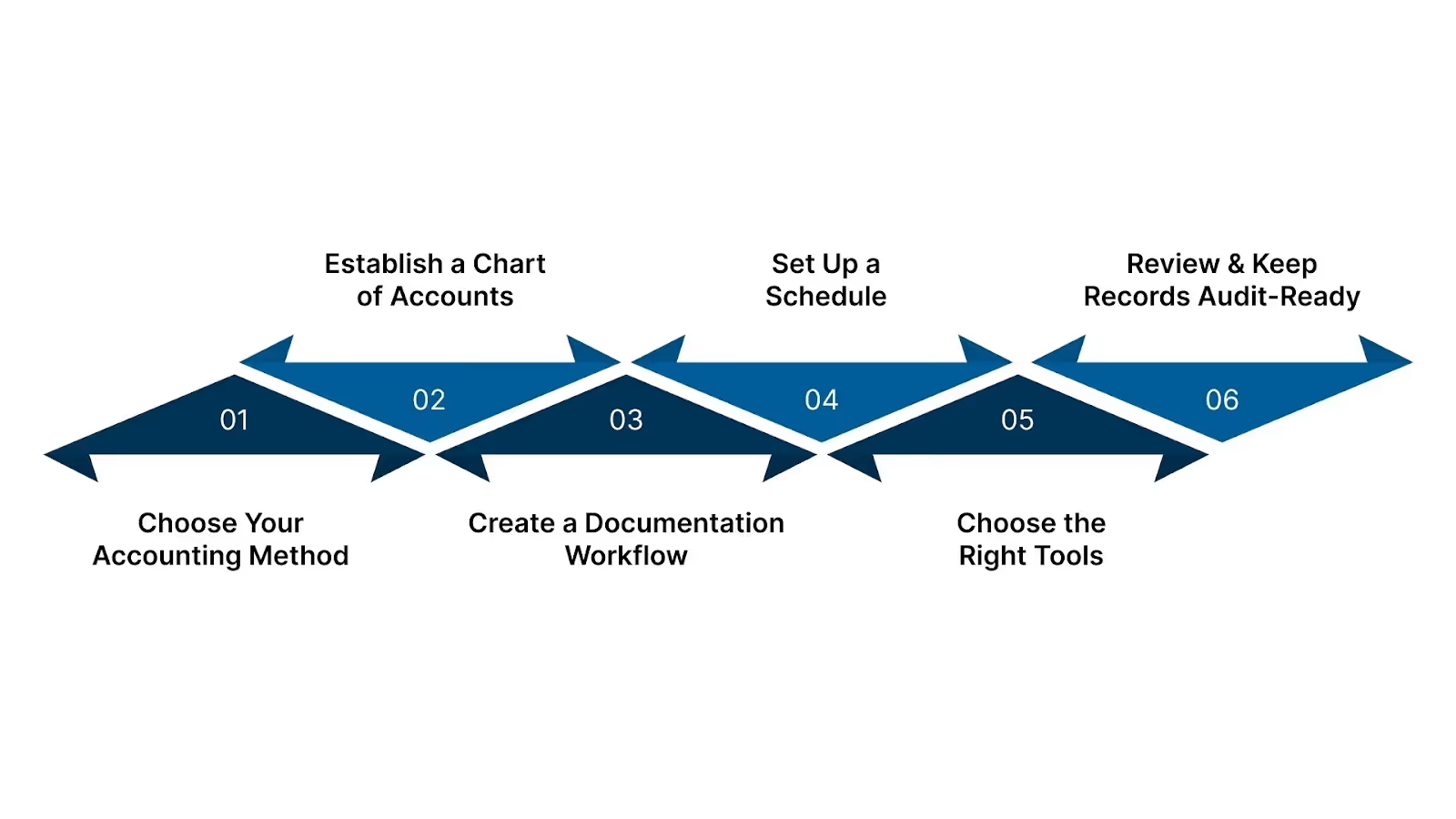
Step 1: Choose Your Accounting Method
Your first big decision shapes all accounting workflows. You can choose between Cash and Accrual.
Cash-basis accounting records income when you receive cash and expenses when you pay. It's simple and common among small businesses. In fact, around 72% of small businesses use a cash-basis because of its simplicity and immediate cash-flow visibility.
Accrual-basis accounting records revenue when earned and expenses when incurred, even if cash moves later. This gives you a more accurate view of profitability, especially when you invoice customers or have unpaid bills.
Which to pick?
Use cash-basis if you have low transaction volume, mostly cash or immediate payments, and want simplicity.
Use accrual-basis if you deal with invoices, credit sales, inventory, or want financial statements that reflect absolute obligations, not just cash flows.
A wrong choice or inconsistent switching can skew tax calculations, cash-flow planning, or performance metrics - something to avoid from the start.
Step 2: Establish a Chart of Accounts
Once you pick a method, structure how you record transactions.
Build aChart of Accounts (COA): categories for income, cost of goods sold (if applicable), expenses (rent, utilities, marketing, payroll), liabilities, assets, and equity.
Keep categories consistent month after month so reporting stays comparable.
A clean chart helps you pull insights quickly, like, Which expenses climbed this quarter?, Are inventory costs eating margins? And where are cash leaks happening?”
Step 3: Create a Documentation Workflow
Paperwork may seem tedious, but it's critical. Mixing personal and business expenses can lead to tax errors and audit issues. Here's how to avoid that:
Use separate business bank accounts and credit cards. Never mix personal spending with business expenses.
For every transaction, keep either a receipt, an invoice, or a copy of a bank statement. Store digitally - e.g., scan invoices and name them clearly ("2025-06-15_Invoice_12345_VendorX.pdf").
Tag or categorize each receipt/invoice immediately. Don't leave sorting for month-end.
This gives you reliable proof for tax deductions, audit readiness, and clean records if you switch to a professional bookkeeper or CPA.
Step 4: Set Up a Schedule
Consistent scheduling keeps bookkeeping manageable and accurate.
Frequency
What to Do
Daily / As transactions happen
Record sales/income, expenses, cash payments, deposits; save receipts/invoices.
Weekly
Review unpaid invoices and upcoming bills, update AR/AP, and check bank feed for new entries.
Monthly
Reconcile bank account, match bank statements to records, reconcile credit card statements, review payroll (if any), categorize expenses, and run a basic financial summary.
This rhythm prevents backlog, reduces errors, and means you're never caught scrambling with a mountain of unsorted receipts before tax deadlines.
Step 5: Choose the Right Tools
Simple spreadsheets might work at first, but as transactions grow, manual tracking becomes error-prone. Trusted tools help manage bookkeeping without overload.
Good small-business accounting platforms include:
QuickBooks Online - widely used cash- or accrual-bookkeeping, suitable for invoices, expenses, and bank reconciliations.
Xero — beneficial for slightly larger SMBs or those with remote clients, supports bank feeds, multi-user, and real-time reconciliation.
Free or low-cost tools — for very small or early-stage businesses with minimal transactions, but only if you maintain strict discipline on entries and documentation.
Even with the best software, the system only works if you stick to the routines above. Tools help; discipline ensures accuracy.
Step 6: Review & Keep Records Audit-Ready
Bookkeeping isn't "set and forget." It needs periodic review and readiness for compliance.
Every quarter, compare financial statements for trends: Are expenses rising? Is cash flow tight?
Keep records (invoices, receipts, bank statements) for at least 3–7 years. IRS often audits returns 3 years back or longer for particular items.
If business grows, buys inventory, hires staff, and sells on credit, consider switching from cash-basis to accrual accounting to reflect reality better.
Staying audit-ready means fewer surprises, simpler tax filings, and smoother access to business loans or investors.
These steps on how to keep accounts for a small business balance simplicity and compliance. You get clean books without being overwhelmed.
Features to Look For When Choosing Bookkeeping Software
Most small-business owners compare software by price or popularity, but the right tool depends on how your business operates day to day. These are the features that make the difference between clean books and constant cleanup.
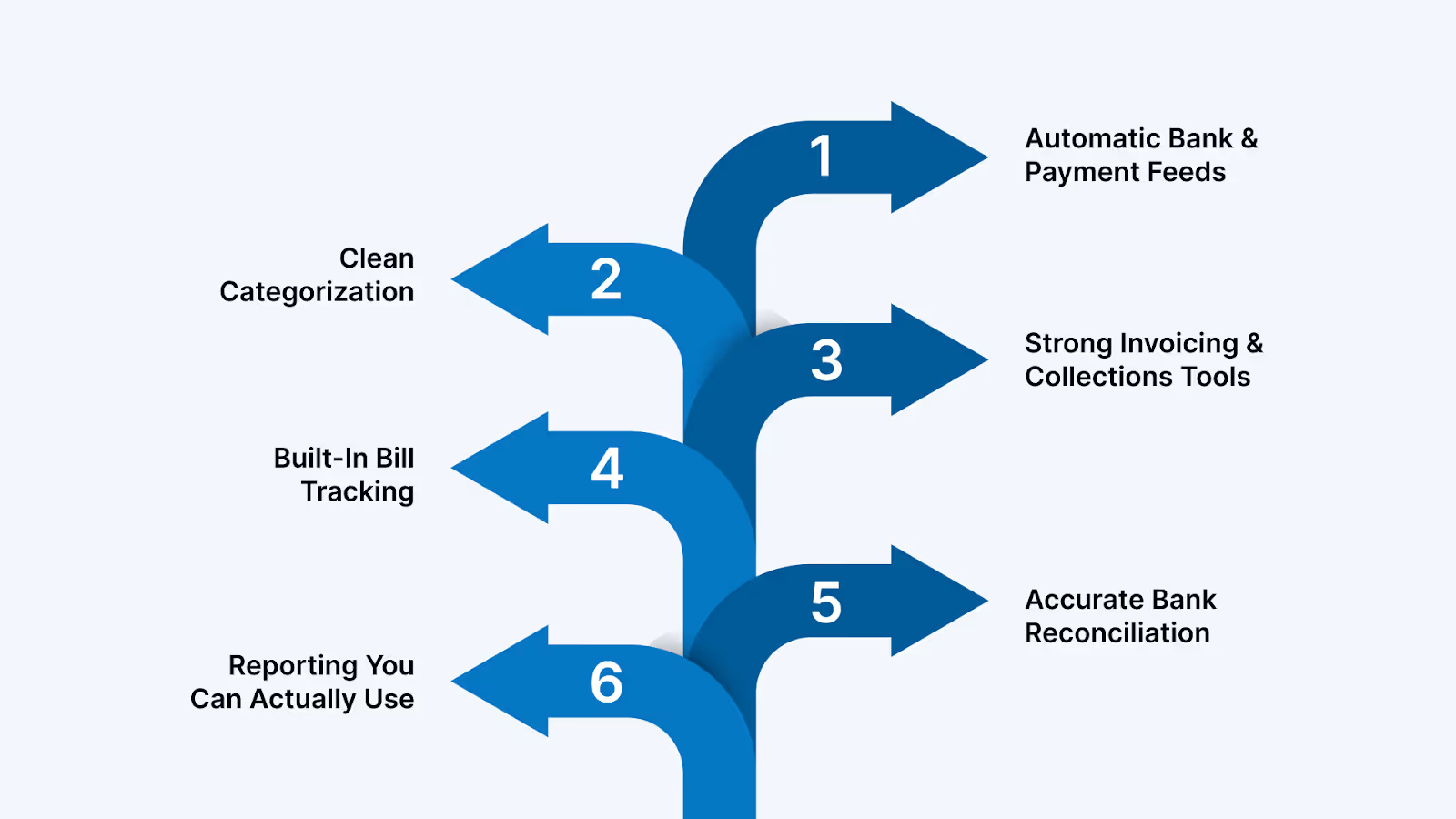
Automatic Bank & Payment Feeds: Your system should pull transactions directly from bank accounts, credit cards, and payment tools (Stripe, PayPal, Square). This eliminates manual entry, reduces missing transactions, and speeds up the monthly close.
Clean Categorization The software should suggest categories, match IRS-aligned labels, and let you customize them. This precise categorization drives accurate deductions and prevents last-minute cleanup at tax time.
Strong Invoicing & Collections Tools Look for automated reminders, payment links, invoice aging, and partial-payment tracking. Most small-business cash-flow issues come from late customer payments, not low sales.
Built-In Bill Tracking You need a dashboard that shows which bills are due, what's upcoming, and what can wait. This prevents overspending and keeps your cash-flow picture honest.
Accurate Bank Reconciliation Your software should automatically match transactions and clearly highlight mismatches. Reconciliation is the step that keeps your books IRS-ready - messy reconciliation = messy records.
Reporting You Can Actually Use At minimum: profit and loss, balance sheet, cash-flow snapshot, and expense breakdowns. Good reports help you understand performance, plan, and avoid surprises.
Software should remove work, not create more of it.
If you're unsure which software fits your business size, industry, and workflow,VJM Globalhelps small businesses choose the right platform and set it up correctly from day one. So you don't waste time fixing avoidable mistakes later.
How Often Should a Small Business Update Its Books?
Different businesses need different bookkeeping rhythms. The correct frequency depends on how your business earns money, gets paid, and spends cash. Updating too late creates gaps; updating too often wastes time.
Here's a clear guide small businesses can rely on.
Business Type
How Often to Update Books
Why This Frequency Works
Service Businesses (consultants, agencies, contractors)
Based on payroll cycle (weekly, bi-weekly, monthly)
Payroll taxes, reimbursements, and time-tracking must match each cycle to avoid compliance issues.
Bookkeeping is fine if skipped for a few days. Skip it for a few weeks, and things get painful fast. Keeping a steady rhythm is what protects your business from avoidable trouble and gives you clarity when you need it most.
Conclusion
Keeping accounts for a small business isn't about becoming an accountant. It's about building a simple system that accurately tracks money, supports clean tax filings, and gives you a clear view of your cash flow.
With proper bookkeeping habits, software, and routines, small businesses avoid IRS issues, reduce year-end stress, and make smarter financial decisions every month. AtVJM Global, we help U.S. small businesses stay organized and compliant by managing the bookkeeping tasks that owners rarely have time for.
Here's how we support you:
Bookkeeping & Accounting Outsourcing: We handle daily, weekly, or monthly bookkeeping using cloud-based systems, keeping your books accurate without adding to your workload.
Setup & Software Implementation: Whether you use QuickBooks, Xero, Zoho Books, or Wave, we set up your chart of accounts, bank feeds, and workflows correctly from day one.
Clean-Up & Catch-Up Services: If your books are behind or disorganized, we clean them up, reconcile them, and rebuild them so your financials are audit-ready and easy to use.
Financial Reporting for Better Decisions: We prepare clear profit-and-loss statements, balance sheets, and cash-flow reports to help you understand your numbers and plan confidently.
Ongoing Advisory for Small Business Growth: From expense structuring to cash-flow planning, we offer ongoing support so you always know where your business stands financially.
Partner with VJM Global to keep your books accurate, compliant, and stress-free while you focus on running and growing your business.Contact us and let us help you build a financial foundation you can rely on.
FAQs
1. What's the easiest way for a small business to start keeping accounts?
Use simple accounting software (QuickBooks, Xero, or Zoho Books), connect your bank feeds, and set a weekly time block to categorize expenses and review invoices. Starting with a routine is more important than starting with complex tools.
2. Should a small business use cash or accrual accounting?
Cash accounting is simpler and works for freelancers or tiny service businesses. Accrual is better if you invoice customers, hold inventory, or want a clearer picture of monthly profitability. Many companies start with cash and move to accrual as they grow.
3. How do I track receipts and expenses without drowning in paperwork?
Use a mobile app that lets you snap receipts and auto-store them in the cloud. Attach them to transactions in your accounting software. This creates a clean audit trail and prevents lost deductions.
4. How often should I reconcile my bank accounts?
Monthly is the minimum, but retail and eCommerce businesses should reconcile weekly. Frequent reconciliation catches errors early and keeps your books reliable for tax filings.
5. When should a small business outsource bookkeeping?
Outsourcing makes sense if you're falling behind on updates, getting IRS notices, miscategorizing expenses, or spending more time fixing books than running your business. Growing businesses also outsource to get accurate monthly reports without hiring full-time staff.
VJM Global
Explore expert insights, tips, and updates from VJM Global