Introduction
GST registration requires every business to declare accurate HSN codes for the goods and services it supplies. As a business grows, adds product lines, or corrects an initial filing error, that declared list often needs updating.
Unlike changing your legal name or business address, updating an HSN code is a simple non-core amendment. Yet many businesses either skip this step entirely or wrongly assume they need a tax officer's sign-off before proceeding.
This guide walks through the exact GST portal steps to add or correct HSN codes. It also covers when to make the change, what to prepare beforehand, and the mistakes that lead to invoice mismatches or penalties.
Whether you're running an established Indian company or a foreign-owned entity navigating GST for the first time, the process is more straightforward than it looks.
Key Takeaways
- HSN code changes are non-core amendments, completed online without tax officer approval
- Updates apply almost immediately after DSC or EVC verification, unlike core field changes
- HSN code length (4 or 6 digits) depends on your turnover in the preceding financial year
- September 2025's GST rate rationalisation requires most businesses to re-check their HSN-to-rate mapping
- Wrong HSN codes can trigger invoice mismatches, audit flags, and penalties
How to Change HSN Code in GST Registration Online
Before diving into the steps, remember this: an HSN code change is a non-core amendment. It doesn't require approval from a Tax Official, unlike changes to your legal name, address, or stakeholders. That distinction saves you time and eliminates unnecessary waiting.
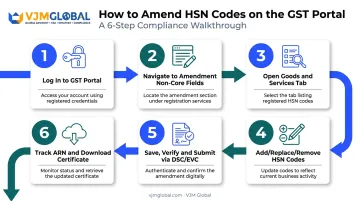
Step 1: Log In to the GST Portal
Access the GST portal at www.gst.gov.in using the username and password linked to your GSTIN. Make sure your registered mobile number and email are active. The portal may send an OTP during submission, and a lapsed number will stall your application.
Step 2: Navigate to Amendment of Registration – Non-Core Fields
From your dashboard, go to Services > Registration > Amendment of Registration Non-Core Fields. Because HSN code details fall under non-core fields, this route skips departmental review entirely. The system auto-approves the change once you submit it correctly.
Step 3: Open the Goods and Services Tab
Click the 'Goods and Services' tab, then select the 'Goods' sub-tab to view your currently declared HSN entries. This screen shows everything you've reported so far, giving you a clear starting point before making edits.
Step 4: Add, Replace, or Remove HSN Codes
- Adding a new code: Search by HSN number or product description, select the matching chapter or heading, then save
- Correcting a wrong entry: Delete the incorrect code and add the accurate one within the same amendment session
- Turnover-based digit rule: Businesses with turnover up to ₹5 crore in the preceding financial year use 4-digit HSN codes; those above ₹5 crore must use 6-digit codes, per Notification No. 78/2020-Central Tax
Exporters often align their invoicing with 8-digit customs tariff codes as a matter of practice, but this isn't a GST registration requirement in itself. Stick to the 4/6-digit rule for your GST filings.
Step 5: Save, Verify, and Submit the Application
Click 'Save and Continue' through each section. You'll need to enter a mandatory reason for the amendment in the text box provided. Don't leave this vague; the portal won't accept a blank or generic entry.
Authenticate and submit using either:
- Digital Signature Certificate (DSC): mandatory for companies, LLPs, foreign companies, and foreign LLPs
- Electronic Verification Code (EVC): available for other eligible entity types via OTP
Step 6: Track the ARN and Download the Updated Certificate
Note down the Application Reference Number (ARN) generated after submission. Download the amended registration certificate from your dashboard once it's processed, typically with an acknowledgement sent within 15 minutes.
Understanding Core vs Non-Core Fields: Why Editing HSN Codes Is Simple
The GST portal splits registration fields into two buckets, and knowing which bucket your change falls into saves considerable time.
Core fields include your legal name (when PAN doesn't change), principal place of business, and addition or deletion of stakeholders such as promoters or partners. These require Tax Officer approval and can take several days to process.
Non-core fields cover everything else, including HSN/SAC codes, bank account details, and other business information. These are self-service: submit correctly, and the change reflects instantly.
Here's how the two categories compare:
| Field Type | Examples | Approval Needed | Processing Time |
|---|---|---|---|
| Core | Legal name, business address, stakeholder changes | Yes, by Tax Officer | Several working days |
| Non-core | HSN/SAC codes, bank details, contact info | No, auto-approved | Near-instant after ARN |
Here's a wrinkle many businesses miss: if a core field amendment is pending approval, you cannot simultaneously file a non-core amendment, including an HSN code update, until the first application resolves. If your business has a name change or address update in progress, hold off on your HSN correction until that clears.
When Should You Update the HSN Code in Your GST Registration
Several scenarios call for an HSN code revision. Recognising them early prevents compliance gaps down the line.
New products or services. When your business starts dealing in goods or services not covered by your existing declared codes, you need to add the relevant HSN or SAC entries before invoicing under them.
Correcting an initial error. An inaccurate code entered during first-time registration can cause invoice-to-return mismatches for months before anyone notices. Fix it as soon as you spot it.
Rate rationalisation exercises. The 56th GST Council meeting in September 2025 rationalised GST rates largely into 5%, 18%, and a special 40% de-merit rate, effective from 22 September 2025. Items like toothbrushes moved from 18% to 5%, while cement dropped from 28% to 18%. Every business must re-verify its HSN-to-rate mapping against the revised schedule.
Turnover crossing ₹5 crore. Once your aggregate turnover in the preceding financial year exceeds this threshold, your mandatory HSN digit length shifts from 4 digits to 6. Businesses growing quickly, particularly exporters scaling into new markets, often miss this trigger until an audit flags it.
Documents and Information You Need Before Making the Change
A little preparation makes the actual portal process fast and error-free. Before logging in, gather:
- Login credentials for the GST portal, along with a registered DSC or EVC-linked mobile number
- A verified HSN/SAC list, cross-checked against the CBIC portal's official HSN search tool rather than relying on memory or old invoices
- Current annual turnover figures from the preceding financial year, to confirm whether you need 4-digit or 6-digit codes
- A specific, valid reason for the amendment, since the portal requires this field before submission
Skipping the turnover check is a common oversight. Businesses that grew past ₹5 crore mid-year sometimes continue filing 4-digit codes out of habit, which creates a mismatch that surfaces later during return scrutiny.
Common Mistakes and Penalties to Avoid When Changing HSN Codes
Even a straightforward process like this trips up businesses in predictable ways:
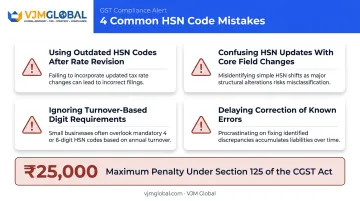
- Using outdated codes after a rate revision: Invoices billed under pre-revision assumptions create mismatches with what's reported in returns, a problem that surged after the September 2025 rate changes.
- Confusing HSN updates with core field changes: Some businesses wait for departmental approval that isn't required, delaying their own compliance unnecessarily.
- Ignoring turnover-based digit requirements: Filing 4-digit codes after crossing the ₹5 crore threshold can trigger notices or scrutiny during GST audits.
- Delaying correction of a known error: The longer a wrong code sits in your registration, the more invoices get generated under it.
That last mistake carries the most financial risk. Under Section 125 of the CGST Act, contraventions with no separately prescribed penalty can attract a fine of up to ₹25,000. This residual provision isn't an automatic fine for every classification disagreement, but it's exposure worth avoiding.
For foreign-owned or NRI businesses unfamiliar with India's HSN structure, getting classification right from the outset matters more. Firms like VJM Global work with international clients across the USA, UK, and Australia to verify HSN classification accuracy and manage GST amendments correctly, an area where local nuance helps when you're managing compliance from another time zone.
Frequently Asked Questions
How to correct HSN code in GST?
Go to Services > Registration > Amendment of Registration Non-Core Fields, delete the incorrect code, and add the accurate one within the same session. Submit using DSC or EVC to complete the correction.
How do I edit details in GST registration?
Editable details fall into core fields, which need Tax Officer approval, or non-core fields, which are self-service and auto-approved. The path you follow depends entirely on which type of detail you're changing.
Do I need approval from a GST officer to change my HSN code?
No. HSN code is a non-core field, so no officer approval is required. The change processes automatically once you submit it with valid DSC or EVC authentication.
How many HSN codes can I add or update during a single amendment?
There's no strict limit for amendments, though the original registration form allows up to five codes. You can add more anytime through a non-core amendment.
What happens if I use the wrong HSN code on invoices?
Incorrect codes can cause return mismatches, audit flags, and penalties of up to ₹25,000 under Section 125 of the CGST Act, particularly if the error isn't corrected promptly.
Can foreign-owned or NRI businesses in India get help changing their HSN codes?
Yes. Firms like VJM Global assist foreign companies and NRIs with GST compliance, including accurate HSN classification and registration amendments tailored to their business structure.