Introduction
Pay GST to an unregistered supplier in Singapore and you lose the right to claim that input tax back — full stop. According to IRAS input tax claim conditions, claiming GST from suppliers who are not registered or whose registration has expired is one of the most common errors leading to disallowed claims and potential penalties.
Verifying a supplier's GST registration before you pay is how you protect your business from that exposure.
Singapore uses GST (Goods and Services Tax), not VAT, though international businesses frequently search for this process as "VAT verification." This guide covers both terms and walks through the IRAS online lookup tool, how to read a GST certificate, what valid tax invoices must include, and what to do if a supplier's registration has lapsed or can't be confirmed.
Key Takeaways
- Singapore's equivalent of VAT is GST, currently set at 9% (effective January 2024)—Singapore has no separate VAT number; GST registration covers both
- Verify suppliers using the IRAS myTax Portal GST Registered Business Search—free, searchable by UEN, business name, GST Reg No, or NRIC
- Confirmed results display the GST Reg No, business name, UEN, registration status (Active/Cancelled), and date range
- You can only claim input tax on purchases from actively GST-registered suppliers—always verify before processing invoices
- Watch for GST charged without a registration number on the invoice, mismatched business names, or a "Cancelled" IRAS status with ongoing GST charges
Singapore GST and VAT: What You Need to Understand Before Verifying
The GST vs. VAT Terminology
Singapore does not have a VAT system—it has GST, introduced on 1 April 1994 at 3%. When international users search for "VAT Singapore" or "VAT ID Singapore," they are looking for the GST Registration Number. They refer to the same thing for verification purposes.
Current GST rate: 9% (effective 1 January 2024, increased from 8%). The increase funds healthcare and senior care programs.
GST Registration Number Formats
For locally incorporated companies, the number typically follows the UEN format:
Local Company UEN Structure:
- Format:
yyyynnnnnX(10 characters) - Example:
200312345A - Year of registration + 5-digit sequence + check letter
Foreign companies registered under the Overseas Vendor Registration (OVR) regime use different formats:
| Entity Type | GST Reg No Format | Example |
|---|---|---|
| GST group/divisional registration | M9nnnnnnnX | M91234567X |
| Sole proprietorships | MRnnnnnnnX | MR2345678A |
| OVR/Simplified Pay-only regime | MB or MX prefix | MB2345678A |
Note: For most local businesses, the UEN and GST Reg No are the same number — but GST registration is a separate process from business incorporation.
Registration Thresholds
Mandatory registration (local businesses): Annual taxable turnover exceeds SGD 1 million — assessed either retrospectively (at calendar year-end) or prospectively (expected to exceed in the next 12 months).
OVR thresholds (overseas vendors): Both conditions must be met:
- Global turnover exceeding SGD 1 million
- Singapore B2C digital service sales exceeding SGD 100,000
If a supplier meets these thresholds but isn't registered, that's a red flag worth investigating before transacting.
What You Need to Run a GST Verification Check
Required Information
Before starting, gather at least one of these identifiers:
- UEN (Unique Entity Number) - most reliable for local companies
- Business name (minimum first 5 characters)
- GST Registration Number
- NRIC (for sole proprietorships)
For OVR-registered foreign entities, note that their GST Reg No format differs (MB or MX prefix) but can still be searched on the same portal.
Access Requirements
The IRAS GST Registered Business Search is completely free and publicly accessible, with no Singpass, Corppass, or account needed. International buyers can verify suppliers instantly.
What to prepare:
- Internet browser
- Supplier's invoice or business document to cross-reference
- Method to save the result (screenshot or PDF) as an audit trail for IRAS compliance
- Invoice date and supply period, needed to interpret registration dates correctly, particularly when confirming whether a supplier was registered at the time of the transaction.
Methods to Verify GST Registration in Singapore
Four methods are available, ranging from official database lookup to document review and direct confirmation. The IRAS portal is the authoritative method; others serve as supporting checks.
Method 1: IRAS myTax Portal GST Registered Business Search (Primary Method)
The IRAS GST Registered Business Search is the official, free lookup tool that confirms real-time registration status. You'll need an internet browser and at least one identifier: the supplier's UEN, business name, GST Reg No, or NRIC.
Step-by-Step:
- Navigate to the IRAS GST Registered Business Search URL
- Enter one accepted identifier: Business Name, UEN, GST Reg No, or NRIC
- Review the returned result displaying: GST Reg No, UEN/NRIC, business name, status (Active or Cancelled), Registered From date, and Registered To date
- Save or print the result as PDF proof of due diligence
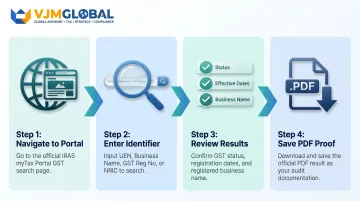
Bulk search capability: Limited to 4 tax reference numbers simultaneously or 1 business name per search. No API or bulk upload available.
Once you run the search, the portal returns the following data fields:
- Business/Legal Name
- GST Registration Number
- Unique Entity Number (UEN)
- Registration Status (Active or Cancelled)
- Effective Date (registration start)
- Cancellation Date (if applicable)
- Remarks column (identifies OVR entities: "Currently registered under Simplified Pay-only Regime")
Why use it: Most accurate and authoritative — directly reflects IRAS records. Free with no login required.
Limitations: Requires at least one correct identifier; cannot bulk-search multiple suppliers simultaneously.
Method 2: Invoice and Document Review
This is a preliminary check using the supplier's tax invoice — useful before or alongside a portal lookup, and requires no internet access.
Step-by-Step:
- Check that the invoice displays the supplier's GST Registration Number clearly (should match their UEN format)
- Confirm the GST amount charged aligns with 9% for supplies on or after 1 January 2024
- Verify all 12 mandatory invoice fields are present:
- Words "Tax Invoice"
- Supplier's name, address, and GST registration number
- Invoice date and identifying number
- Customer's name and address
- Description of goods/services
- GST rate applicable
- Total amounts (excluding GST, GST amount, including GST)
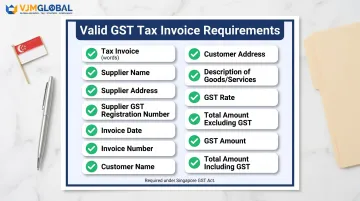
Red flag: If a supplier charges GST but the invoice shows no GST Reg No, or shows only a UEN without confirmed GST registration, run a portal verification check.
Why use it: Fast first-level screen requiring no internet.
Limitations: Does not confirm registration validity — always follow up with an IRAS portal lookup when the invoice raises doubts.
Method 3: Direct Supplier Confirmation and GST Certificate Request
This method involves requesting the supplier's IRAS-issued GST Registration Certificate or written confirmation of their registration number — particularly useful when onboarding new vendors.
Step-by-Step:
- Ask the supplier to provide their GST Registration Certificate (issued by IRAS upon successful registration) or confirm their GST Reg No via email
- Compare the certificate number against the IRAS portal result to confirm it is current and active
- Retain the supplier's written confirmation and portal result together in your records for audit purposes
Why use it: Useful for onboarding new suppliers and creating a documented compliance trail.
Limitations: Dependent on supplier cooperation; the certificate may also be outdated if the supplier's registration status changed after issuance.
How to Interpret Your GST Verification Results
What the IRAS portal returns—specifically the Status and date fields—determines what action you must take next. Misreading results (e.g., treating a Cancelled supplier as active) leads to invalid input tax claims during audits.
Active Status (No Action Required)
If the portal returns "Active" and the registration date predates the invoices you hold, the supplier is validly registered. You may claim input tax credits for those invoices. Document the portal result with the date of check.
Cancelled Status (Check Dates Before Claiming)
If the portal shows "Cancelled," note the "Registered To" date. The validity of your input tax claim depends entirely on when the invoice was issued:
- Invoices within the active period (between "Registered From" and "Registered To"): valid for input tax claims
- Invoices dated after "Registered To": GST should not have been charged — do not claim the credit and request a corrected invoice
No Result Found or Status Mismatch (Action Required)
If no result is returned for the supplier's identifier, or if the business name on the invoice does not match the IRAS registered name:
- Do not pay the GST portion of the invoice
- Contact the supplier for clarification
- Request a corrected invoice without GST
- Report suspected GST fraud to IRAS through their official reporting channel if the supplier refuses to cooperate
Rate Mismatch on Invoice
If the invoice charges a GST rate other than 9% for supplies made on or after 1 January 2024, do not claim the input tax credit — request a corrected invoice before processing payment.
Rate history:
- 7% (pre-2023)
- 8% (1 Jan 2023 – 31 Dec 2023)
- 9% (1 Jan 2024 onward)
For invoices spanning rate change dates, refer to IRAS's GST rate change transitional rules/gst-rate-change-for-businesses) to confirm which rate applies and whether a corrected invoice is needed.
Once you've confirmed supplier status and the correct rate, your verification record is complete — retain the portal screenshot alongside the invoice for audit documentation.
Common Errors and Red Flags in GST Verification
These are the most frequent mistakes that lead to invalid input tax claims or GST paid to fraudulent suppliers.
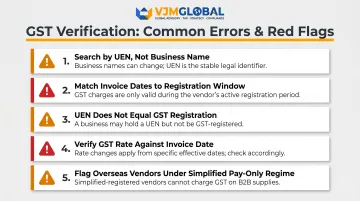
- Search by UEN, not business name. Name discrepancies — abbreviations, trading names vs. legal names — can return no results even for legitimate registrants. UEN is unique and eliminates name-matching failures entirely.
- Match invoice dates to the active registration window. A supplier may have been registered in the past but deregistered before your transaction. Always check the "Registered From" and "Registered To" dates, not just whether a registration exists.
- Don't assume UEN equals GST registration. A business can hold a UEN without being GST-registered. Confirm status through the IRAS GST lookup tool directly — ACRA's BizFile will not show GST registration status.
- Verify the GST rate against the invoice date. Since the rate changed to 9% on 1 January 2024, some invoices may still show 8%. Claiming at the wrong rate creates discrepancies in IRAS audits.
- Flag overseas vendors under the Simplified Pay-only Regime. GST charged by these vendors cannot be claimed as input tax. Look for the "Currently registered under Simplified Pay-only Regime" note in IRAS search results, and check for MB/MX prefixes on GST numbers.
Best Practices for Ongoing GST Compliance Verification
Establish a Supplier Onboarding Routine
Verify GST registration status for every new supplier before the first invoice is processed, not after. Save the portal result as a PDF with a timestamp.
For existing suppliers, re-verify periodically:
- At least annually
- When invoices show any change in GST Reg No, business name, or registered address
- Before processing unusually large transactions
This is the simplest and lowest-cost audit risk mitigation available to any buyer processing Singapore invoices.
Maintain Verification Records for at Least Five Years
IRAS requires businesses to retain GST-related records for a minimum of five years. Your verification records form part of your input tax substantiation and should include:
- Portal results with timestamps
- Supplier confirmations
- GST registration certificates
For businesses managing cross-border operations, Singapore supplier verification should be a standard step in accounts payable and supplier onboarding workflows — not an afterthought. VJM Global works with foreign companies to build these compliance processes into their day-to-day operations, covering Singapore GST verification alongside obligations across other jurisdictions.
Contact IRAS Directly for Edge Cases
If a supplier's portal status is unclear, contact IRAS by hotline or email for direct confirmation before processing any input tax claims. This applies especially to foreign OVR-registered entities, whose registration format differs from local UEN-based numbers.
Frequently Asked Questions
How to check VAT number online?
Singapore does not issue VAT numbers—the equivalent is the GST Registration Number. Verify it for free on the IRAS myTax Portal GST Registered Business Search by entering any of the following:
- UEN
- Business name
- GST Reg No
- NRIC
No login required.
Is a VAT checker free to use?
Yes, the IRAS GST Registered Business Search is completely free and publicly accessible. No registration, account, or fee is needed to look up a company's GST registration status on the official IRAS portal.
Is there a VAT in Singapore?
No. Singapore does not have a VAT system. The equivalent consumption tax is GST (Goods and Services Tax), currently at 9% as of 1 January 2024. When international sources refer to "Singapore VAT," this refers to Singapore GST.
What is VAT ID for Singapore?
There is no "VAT ID" in Singapore. The equivalent is the GST Registration Number — formatted as a UEN for local entities (e.g., 201812927R) or a distinct OVR format for foreign entities (e.g., M90000001A). It must appear on all valid GST tax invoices.
What is a VAT checker used for?
A VAT/GST checker confirms whether a business is legitimately registered to charge GST. Buyers use it to verify input tax credit eligibility, guard against fraudulent suppliers, and meet IRAS audit requirements.