This guide covers what UK accounting codes are, the five core account categories, how codes map to your Profit & Loss and Balance Sheet, the most common codes for revenue and expenses, how they work in platforms like Xero and Sage, and the UK accounting standards that govern their use.
Key Takeaways
- UK accounting codes (nominal codes) are unique reference numbers classifying every financial transaction in your chart of accounts
- Five main categories cover all transactions: Sales/Income, Purchases/Cost of Sales, Overheads/Expenses, Assets, and Liabilities & Capital
- Accounts split into two types: Profit & Loss (reset annually) and Balance Sheet (carry forward year to year)
- Xero, Sage, and QuickBooks each use different default code ranges — but all follow the same underlying category structure
- Check that your chart of accounts aligns with FRS 102 or FRS 105 before filing statutory accounts
What Are UK Accounting Codes?
UK accounting codes are unique numerical identifiers assigned to specific transaction types within your business's chart of accounts. These codes are commonly called "nominal codes" or "nominal ledger codes" in UK accounting practice – the terms are used interchangeably. Sage UK's official documentation confirms that nominal codes form "the nominal ledger, also known as the general ledger."
Purpose of accounting codes:
- Categorise income, expenses, assets, liabilities, and equity
- Generate accurate Profit & Loss and Balance Sheet reports
- Ensure financial records are auditable and HMRC-compliant
- Enable analysis of business performance by transaction type
Your chart of accounts is the master list of all accounting codes your business uses. UK businesses typically follow a numbering convention where code ranges are assigned to specific categories. For example, codes in the 4000 range might represent sales revenue, while codes in the 7000 range represent overheads.
Important distinction: UK accounting codes are completely different from PAYE tax codes like 1257L. PAYE tax codes determine how much income tax is deducted from employee salaries — 1257L, for instance, represents a £12,570 personal allowance.
Accounting codes relate to bookkeeping and financial reporting. They serve an entirely different purpose and should not be confused.
The specific codes your business uses vary depending on your accounting software (Xero, Sage, QuickBooks) and business type (sole trader, partnership, limited company, charity). The five core categories, however, apply across all of them.
The 5 Main Categories of UK Accounting Codes
Every nominal code in your UK chart of accounts belongs to one of five core categories. Understanding these categories is essential for accurate transaction classification.
Sales / Income
Sales codes capture revenue earned from core business activities – products sold or services delivered. These codes appear on your Profit & Loss statement and form the top line of your financial performance.
Default code ranges by platform:
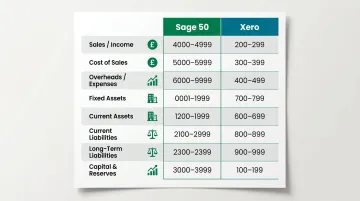
- Sage 50: 4000-4999 (not 0000-1999 as sometimes stated)
- Xero: 200 (Sales Revenue), 260 (Other Revenue), 270 (Interest Income)
You can create sub-codes for different revenue streams:
- Product sales vs. service fees
- Rental income
- Government grants
- Interest income from savings
Cost of Sales / Purchases
Cost of Sales codes track direct costs tied to generating revenue — producing your products or delivering your services. Getting these right is what separates gross profit from operating profit.
Common Cost of Sales codes:
- Stock purchases (goods bought for resale)
- Raw materials
- Direct labour (production workers)
- Subcontractor costs
- Manufacturing overheads directly tied to production
In Xero, Direct Wages appears as code 320. In Sage 50, purchases typically fall in the 5000-5201 range.
Overheads / Expenses
Overheads represent operating costs that keep your business running but aren't directly tied to producing specific products or services. These make up the largest category in most charts of accounts.
Example distinction: A production worker's wages (directly making products) go to Cost of Sales. A manager's salary (overseeing operations generally) goes to Overheads.
Common overhead categories:
- Rent, rates, insurance, utilities
- Salaries and employer National Insurance
- Professional fees (legal, accountancy)
- IT software and office supplies
- Marketing and advertising
- Bank charges and loan interest
- Telephone and internet
In Sage 50, overheads typically range from 7000-8250. In Xero, they're spread across codes 400-500.
The first three categories (Sales, Cost of Sales, Overheads) all feed your Profit & Loss statement. The final two — Assets and Liabilities — sit on the Balance Sheet instead.
Assets
Asset codes track what your business owns. They split into two groups based on how long you'll hold them.
Fixed assets are long-term holdings:
- Property and land
- Plant and machinery
- Motor vehicles
- Office equipment and computer equipment
- Intangible assets (goodwill, patents)
Current assets are short-term items expected to convert to cash within a year:
- Cash at bank
- Accounts receivable (debtors)
- Inventory/stock
- Prepayments
In Sage 50, Fixed Assets occupy codes 0010-0051 and Current Assets use 1001-1250. In Xero, key asset codes include 610 (Accounts Receivable), 710 (Office Equipment), and 720 (Computer Equipment).
Liabilities and Capital & Reserves
Liability codes cover what your business owes, split by when repayment is due.
Current liabilities (due within one year):
- Trade creditors (accounts payable)
- VAT payable
- PAYE and NIC payable
- Corporation tax payable
- Short-term loans or overdrafts
Long-term liabilities (due after one year):
- Bank loans
- Mortgages
- Hire purchase obligations
In Sage 50, Current Liabilities occupy 2100-2230 and Long-Term Liabilities use 2300-2330.
Capital & Reserves codes represent owner's equity — what the business owes back to its owners:
- Share capital (Ordinary shares, Preference shares)
- Retained earnings (accumulated profits)
- Revaluation reserves
In Sage 50, these appear as codes 3000-3200. In Xero, code 960 represents Retained Earnings and 970 represents Share Capital.
Quick reference: Code ranges across Sage 50 and Xero
| Category | Sage 50 Range | Xero Codes |
|---|---|---|
| Sales / Income | 4000–4999 | 200, 260, 270 |
| Cost of Sales | 5000–5201 | 300s (e.g., 320 Direct Wages) |
| Overheads / Expenses | 7000–8250 | 400–500 |
| Fixed Assets | 0010–0051 | 710, 720 |
| Current Assets | 1001–1250 | 610 |
| Current Liabilities | 2100–2230 | Varies by account |
| Long-Term Liabilities | 2300–2330 | Varies by account |
| Capital & Reserves | 3000–3200 | 960, 970 |
How UK Accounting Codes Map to the P&L and Balance Sheet
Your chart of accounts divides into two main sections, each serving a distinct purpose in financial reporting.
Profit & Loss accounts include:
- Sales/Income
- Cost of Sales
- Overheads/Expenses
- Taxation
Balance Sheet accounts include:
- Fixed Assets
- Current Assets
- Current Liabilities
- Long-Term Liabilities
- Capital & Reserves
How the P&L Section Works
Transactions coded to Sales, Cost of Sales, and Overhead accounts accumulate during each accounting period (typically one year). These accumulations calculate:
- Gross Profit = Sales Revenue minus Cost of Sales
- Net Profit = Gross Profit minus Overheads minus Taxation
Simple worked example:
- Sales (code 4000): £150,000
- Cost of Sales (code 5000): £60,000
- Gross Profit: £90,000
- Overheads – Rent (code 7100): £12,000
- Overheads – Salaries (code 7003): £35,000
- Overheads – Other (codes 7200-7900): £18,000
- Total Overheads: £65,000
- Net Profit before tax: £25,000
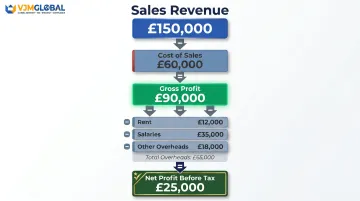
At year-end, P&L accounts reset to zero. The net profit or loss transfers to Retained Earnings on the Balance Sheet.
How Balance Sheet Codes Work
Unlike P&L codes, Balance Sheet codes carry forward their balances from one period to the next. Your Balance Sheet is a cumulative snapshot of your financial position at a specific point in time.
If you incorrectly code a transaction to the wrong Balance Sheet account, the error persists until corrected, because these codes don't reset at year-end the way P&L accounts do.
The Role of Taxation
Corporation Tax appears in two places:
- P&L: As an expense after operating profit (Xero code 500, Sage code 9001)
- Balance Sheet: As a current liability until paid (Xero code 825, Sage code 2110)
The treatment differs across the three main tax obligations:
- Corporation Tax – appears on both the P&L and Balance Sheet
- VAT – sits purely on the Balance Sheet as a current liability
- PAYE – also a Balance Sheet current liability until remitted to HMRC
Common UK Nominal Codes for Income and Expenses
While code numbers vary between software platforms, there are standard revenue and expense codes most UK businesses use.
Common Income Codes
Xero UK defaults:
- 200 – Sales (primary trading income)
- 260 – Other Revenue (non-standard/non-recurring income)
- 270 – Interest Income
Sage 50 defaults:
- 4000 – Sales (primary trading income)
- 4900 – Miscellaneous Income
- Sales codes generally fall in the 4000–4999 range
Common Overhead Codes
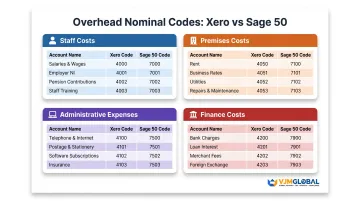
Staff costs:
| Category | Xero Code | Sage 50 Code | Account Name |
|---|---|---|---|
| Salaries | 477 | 7003 | Staff Salaries |
| Directors' Pay | 478 | 7001 | Directors Salaries |
| Employer NIC | 479 | 7006 | Employers N.I. |
| Pensions | 482 | 7007 | Employers Pensions |
Premises costs:
| Category | Xero Code | Sage 50 Code | Account Name |
|---|---|---|---|
| Rent | 469 | 7100 | Rent |
| Rates | 465 | 7103 | General Rates |
| Insurance | 433 | 7104 | Premises Insurance |
| Utilities | 445 | 7200 | Light, Power, Heating |
Administrative expenses:
| Category | Xero Code | Sage 50 Code | Account Name |
|---|---|---|---|
| Telephone | 489 | 7550 | Telephone & Internet |
| IT Software | 463 | 7552 | IT Software and Consumables |
| Legal Fees | 441 | 7600 | Legal Expenses |
| Accountancy | 401 | 7602 | Audit & Accountancy fees |
Finance costs:
| Category | Xero Code | Sage 50 Code | Account Name |
|---|---|---|---|
| Bank Charges | 404 | 7901 | Bank Charges |
| Interest Paid | 437 | 7900 | Bank Interest Paid |
Depreciation Codes
Depreciation codes sit across two financial statements simultaneously — miscoding them distorts both your reported profit and your balance sheet asset values in the same period.
The systematic allocation of an asset's cost over its useful life, depreciation is a mandatory requirement under FRS 102 Section 17 for UK businesses holding tangible long-term assets.
How depreciation appears in your accounts:
- P&L (Overhead): Annual depreciation charge (Xero 416, Sage 8000) — reduces reported profit each year
- Balance Sheet (Asset reduction): Accumulated depreciation reduces the asset's carrying value over time
Key point: Depreciation is a non-cash expense. When calculating cash flow, you must add depreciation back to net profit because no money actually left the business.
UK Accounting Codes in Sage, Xero, and Other Software
UK accounting software platforms use different numbering conventions for the same underlying account categories — assets, liabilities, income, costs, and overheads. Understanding how each platform handles these will help you set up, migrate, or customise your chart of accounts correctly.
Platform-Specific Code Systems
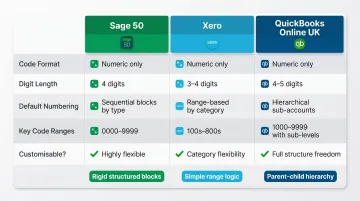
Sage 50 Accounts:
- Uses a 4-digit numeric system (codes must be 4-8 digits, numbers only)
- Fixed Assets: 0010-0051
- Current Assets: 1001-1250
- Sales: 4000-4999
- Purchases: 5000-5201
- Overheads: 7000-8250
Xero:
- Uses a 3-digit default system (expandable to 10 characters)
- Can include letters, numbers, or symbols
- Income: 200-270
- Direct Costs: 310-325
- Overheads: 400-500
- Assets: 610-720
- Liabilities: 800-900
QuickBooks Online UK:
- Account numbers are optional – not pre-assigned by default
- Uses Account Types (Assets, Liabilities, Equity, Income, Expenses) and Detail Types instead
- Users must manually enable account numbers via Settings
Customising Your Chart of Accounts
Businesses can customise their chart of accounts by:
- Adding new codes for business-specific transaction types
- Renaming existing codes to match your terminology
- Creating sub-accounts for more granular reporting
Critical warning: Never delete or repurpose codes that have historical transactions attached. Doing so corrupts your historical reporting and makes audit trails impossible to follow.
This is particularly important when migrating between platforms — because Sage, Xero, and QuickBooks use different numbering systems, careful code mapping is required to preserve data integrity.
Statutory Reporting Requirements
UK limited companies must structure their chart of accounts to support statutory reporting formats required by Companies House. Your nominal codes must map to disclosure categories under:
- FRS 102 (applicable to most UK SMEs)
- FRS 105 (for micro-entities)
Both standards were updated in September 2024, with periodic review changes taking effect from 1 January 2026.
Company size thresholds (as of April 2025):
| Threshold | Micro-entity | Small Company |
|---|---|---|
| Turnover | £1 million or less | £15 million or less |
| Balance sheet | £500,000 or less | £7.5 million or less |
| Employees | 10 or fewer | 50 or fewer |
Companies must meet any two of three criteria to qualify. These thresholds increased significantly in April 2025.
Specialist accounting software like IRIS Accounts Production maps nominal codes directly to statutory P&L and balance sheet formats, supporting FRS 101, FRS 102 (including Section 1A), FRS 105, and Companies House e-filing with iXBRL tagging.
Managing Your UK Accounting Codes: Best Practices
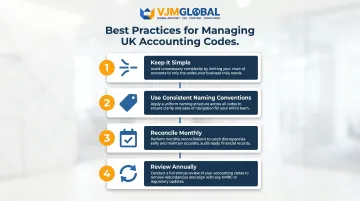
Maintaining a clean, effective chart of accounts requires ongoing discipline. These four practices keep your nominal codes accurate and audit-ready:
- Keep it simple — Avoid creating too many codes. Every addition increases miscoding risk; if you rarely use a code, merge it with a similar category.
- Use consistent naming conventions — Clear, descriptive names like "Office Rent" beat vague labels like "Premises Cost A." Consistency cuts training time and errors.
- Reconcile monthly — Review accounts receivable, accounts payable, VAT control accounts, and bank accounts each month to catch discrepancies before they compound.
- Review annually — Add codes when entering new revenue streams, and archive codes you no longer need. Never delete codes with historical transactions attached.
For UK businesses managing multiple entities or complex revenue streams, keeping accounting codes accurate manually becomes difficult to sustain. Outsourcing to a specialist firm is a practical alternative.
VJM Global has supported over 250 UK businesses with outsourced accounting, ensuring nominal codes align with HMRC guidelines and statutory reporting standards. Their services include:
- Bookkeeping and VAT return preparation
- Statutory reporting and compliance filings
- Accounting software migration support
Frequently Asked Questions
What are accounting codes?
Accounting codes (or nominal codes) are unique numerical identifiers used to classify financial transactions in a business's chart of accounts. They enable accurate financial reporting, consistent categorisation of income and expenses, and clearer analysis of business performance.
What are the 5 account categories?
The five main categories are Sales/Income, Cost of Sales/Purchases, Overheads/Expenses, Assets, and Liabilities & Capital. Sales, Cost of Sales, and Overheads feed the Profit & Loss statement; Assets, Liabilities, and Capital feed the Balance Sheet.
What are the five accounting codes used on revenue?
The exact codes vary by software, but typical UK revenue codes cover Sales Revenue, Other Revenue, Interest Income, and business-specific streams such as rental income, government grants, or commission. Most businesses use 3–5 revenue codes in total.
What are the UK accounting standards?
UK accounting standards are set by the Financial Reporting Council (FRC). Key standards include FRS 102 (applicable to most UK SMEs), FRS 105 (for micro-entities meeting size thresholds), and FRS 101 (for subsidiaries of listed groups). Your chart of accounts must be structured to support statutory reporting under the relevant standard for your company size.
What is the difference between a nominal code and a tax code in the UK?
Nominal codes are bookkeeping reference numbers used to categorise business transactions in accounting software (e.g., code 469 for Rent in Xero, code 7100 in Sage). Tax codes like 1257L are HMRC codes determining how much income tax is deducted from employee salaries – they serve entirely different purposes and have no connection to your chart of accounts.