Yet implementation cost remains one of the most misunderstood variables in any ERP decision. The final number depends on business size, deployment model, user count, customization depth, and industry requirements. Misreading these variables leads to one of two outcomes: an underbuilt system that can't support growth, or a blown budget that derails the project mid-implementation.
This guide covers US-specific pricing ranges by business size, the key cost drivers, a full cost breakdown, and a practical framework for building a realistic ERP budget.
Key Takeaways
- ERP costs range from ~$25,000 for small cloud deployments to $5M+ for enterprise implementations
- Implementation services typically represent 50%–70% of first-year ERP spend — more than the software itself
- Cloud ERP dominates new implementations, with 65% of organizations choosing cloud deployment per Panorama's 2024 ERP Report
- The correct comparison metric is total cost of ownership (TCO) over 5–10 years, not the sticker price
- Under US GAAP (ASC 350-40), only specific implementation phases qualify for capitalization
How Much Does ERP Implementation Cost in the US?
There is no single price for ERP implementation. A small business deploying a cloud accounting and inventory platform will spend very differently from a manufacturer rolling out SAP across five facilities. A useful planning benchmark: budget 1%–2% of annual revenue for ERP implementation, according to Genius ERP's budgeting guidance.
What catches most buyers off guard is how heavily implementation services dominate year-one spend. Per ERP Research, implementation typically accounts for 50%–70% of first-year ERP costs, while software licensing represents only 20%–30%. In practical terms, your consulting and configuration bill will likely exceed your software bill.
Cost Ranges by Business Size
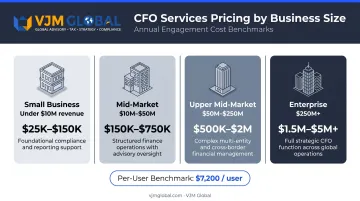
| Business Segment | Annual Revenue | Typical First-Year Cost Range |
|---|---|---|
| Small Business | Under $10M | $25,000–$150,000 |
| Mid-Market | $10M–$50M | $150,000–$750,000 |
| Upper Mid-Market | $50M–$250M | $500,000–$2M |
| Enterprise | $250M+ | $1.5M–$5M+ |
These estimates assume:
- Small business figures assume a cloud/SaaS deployment with limited customization and fewer than 100 employees
- Enterprise figures for SAP or Oracle implementations frequently exceed $5M when multi-site configuration, legacy integration, and change management are included
- Per-user benchmarks average around $7,200/user across company sizes, per ERPFocus data
Understanding the Implementation-to-License Ratio
The implementation-to-license ratio scales with complexity. Smaller deployments typically run at a 1:1 to 1.5:1 ratio (implementation cost to license cost). Larger enterprise projects commonly reach 3:1 or higher. The implementation-to-license ratio scales with project complexity. Smaller deployments typically run at a 1:1 to 1.5:1 ratio (implementation cost to license cost). Larger enterprise rollouts commonly reach 3:1 or higher — meaning for every dollar spent on software, three go toward services. Understanding this ratio is critical before finalizing your budget, and the next step is identifying which cost drivers push projects toward the higher end of these ranges.
Key Factors That Affect ERP Implementation Cost
ERP pricing is shaped by a combination of technical, organizational, and vendor-specific variables. Understanding these upfront prevents mid-project budget surprises.
Deployment Model: Cloud vs. On-Premise vs. Hybrid
The deployment choice is the largest structural cost decision in any ERP project.
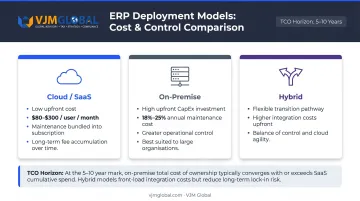
Cloud/SaaS ERP:
- Lower upfront cost — no hardware purchase required
- Microsoft Dynamics 365 Business Central runs $80–$110/user/month; Dynamics 365 Finance runs $210–$300/user/month
- Maintenance is typically bundled into the subscription
- Cumulative subscription fees can exceed on-premise TCO for large organizations over long time horizons
On-Premise ERP:
- High upfront capital expenditure (servers, infrastructure, IT staffing)
- Annual maintenance fees typically run 18%–25% of original licensing cost
- Greater control over customization and data security
- Better suited to large organizations with existing infrastructure and strict compliance requirements
Hybrid ERP:
- Combines on-premise core operations with cloud modules (HR, CRM, mobile access)
- Useful for businesses transitioning from legacy systems
- Higher integration costs upfront, but offers flexibility during the transition period
NetSuite recommends calculating TCO across a 5–10 year horizon — the only timeframe that enables a genuine apples-to-apples comparison between deployment models.
Number of Users and Licensing Structure
User count is one of the most controllable cost levers in ERP planning. Most vendors price on a per-user basis (named users vs. concurrent users), and the difference matters at scale.
- Under-licensing limits system adoption and reduces ROI
- Over-licensing inflates recurring costs without corresponding value
- Named user licenses cost more per seat but give dedicated access; concurrent licensing is cheaper per seat but restricts simultaneous access
Typical cloud ERP user pricing spans $80–$300/user/month depending on module and vendor tier.
Customization Level
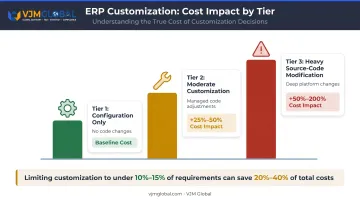
Customization is where ERP budgets most often expand unexpectedly. ERP Research data shows that limiting customizations to under 10%–15% of requirements can save 20%–40% of total implementation costs.
The practical breakdown:
| Customization Level | Cost Impact on Implementation |
|---|---|
| Configuration only (no code changes) | Baseline |
| Moderate customization | +25%–50% |
| Heavy/source-code modification | +50%–200% |
Avoiding source-code modifications is especially important for long-term cost management. SAP's clean-core approach and Oracle's ERP configuration guidance both emphasize that code-level changes create upgrade barriers and escalating maintenance costs over time.
Business Complexity
Industry type, geography, and regulatory environment all drive cost upward:
- Manufacturing and distribution require MRP, warehouse management, and supply chain modules
- Healthcare and pharma need compliance and audit trail features
- Multi-site and multinational operations add configuration, data migration, and training overhead
- Regulated industries often require additional security and access controls
Data Migration and Third-Party Integrations
Data migration is one of the most underestimated cost drivers in ERP projects. Cleaning, mapping, and validating legacy data demands significant consultant hours — particularly when records are incomplete or spread across multiple systems.
Third-party integrations (CRM, BI tools, ecommerce platforms) typically add $5,000–$50,000 per integration depending on complexity. Each additional system connection raises both the implementation timeline and total cost, so auditing your existing tech stack early is worth the effort.
Complete Cost Breakdown of ERP Implementation
ERP implementation cost covers far more than software. Most US businesses underestimate total spend by 30%–50% because vendor quotes only reflect one slice of the picture — here's the full breakdown:
1. Software Licensing / Subscription Fees One-time (perpetual) or recurring (SaaS). Represents roughly 20%–30% of first-year spend.
2. Implementation and Setup Costs The single largest cost category. Includes business needs analysis, system configuration, data migration, testing, and go-live support. North American consultant rates run $150–$350/hour. Total implementation costs range from $10,000 for a small cloud deployment to $150,000+ for enterprise projects.
3. Training and Change Management Often underfunded. Many projects allocate only 5%–10% of total implementation cost to training; industry best practice recommends 15%–20%. Skimping here is one of the fastest ways to undermine user adoption after go-live.
4. Ongoing Maintenance and Support
- On-premise: annual maintenance typically 18%–25% of original license cost
- SaaS: maintenance included in the subscription fee
- Both models may offer optional premium support tiers
5. Hidden and Indirect Costs Budget for these even though they won't show up in any vendor proposal:
- Temporary productivity loss during go-live transition
- IT staffing costs for on-premise deployments
- Security framework implementation
- New hire training as staff turns over
- Unforeseen customization requests mid-project
Budget recommendation: Build a 10%–20% contingency buffer into the total ERP budget. For complex or first-time deployments, lean toward 20% — unexpected scope creep in year one is the norm, not the exception.
How to Estimate the Right ERP Budget for Your Business
The right ERP budget is not the cheapest option — it is the option that fits what the business needs now and over the next 3–5 years.
Step-by-Step Estimation Approach
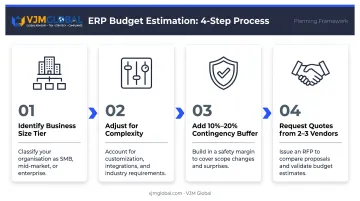
- Identify your business size tier and use the ranges from the pricing table above as a baseline
- Adjust upward for customization needs, number of integrations, regulated industry requirements, and multi-site complexity
- Add 10%–20% contingency to the adjusted total
- Request a ballpark from 2–3 vendors before deep evaluation — asking for a minimum implementation fee by company size quickly eliminates mismatches
What to Quantify Before Requesting Quotes
- Number of users and departments
- Required modules (finance, inventory, HR, manufacturing, etc.)
- Deployment preference (cloud, on-premise, hybrid)
- Existing systems requiring integration
- Data volume and migration complexity
TCO Is the Right Comparison Metric
TCO covers software, implementation, training, support, and hardware across a 5–10 year horizon — the only basis on which cloud and on-premise proposals can be fairly compared. NetSuite's TCO framework breaks total cost into six categories:
- Software subscription or licensing fees
- Hardware and infrastructure
- Change management and training
- Data migration
- Temporary backfill during transition
- Employee time lost to implementation
For US-based businesses, TCO analysis also requires a CapEx vs. OpEx classification decision under US GAAP — one that directly affects tax treatment and financial reporting. Firms like VJM Global advise on exactly this: structuring ERP investment costs to align with US accounting standards and avoid reporting errors.
Common ERP Budgeting Mistakes to Avoid
Comparing Systems on License Price Alone
The software price is not the total cost. In many cases, the first-year total runs 2x–3x the software license fee when implementation, training, and support are included. Over a five-year period, ongoing costs frequently exceed the initial investment. The correct comparison metric is TCO, not sticker price.
Underestimating Customization and Data Migration
Scope expansion mid-project is a major cause of ERP budget overruns. Businesses consistently underestimate how much time and consultant cost goes into migrating historical data and configuring the system to match their workflows.
The most effective cost-control strategies:
- Select a system that meets 80%+ of requirements out of the box
- Minimize source-code changes entirely
- Define data migration scope in writing before contracts are signed
A US-specific accounting detail applies here: under US GAAP (ASC 350-40), certain ERP implementation costs can be capitalized — specifically costs incurred during the application development stage (coding, testing). Costs in the preliminary project stage and post-implementation stage must be expensed.
Misapplying this distinction affects both financial reporting and your tax position. This is where working with qualified accounting professionals, like those at VJM Global, helps US businesses avoid costly reporting errors.
Choosing the Wrong Vendor Without Validating Fit
Selecting an ERP vendor based on brand recognition or the lowest bid — without evaluating industry fit, implementation methodology, and post-go-live support — is a costly mistake. Best practice:
- Evaluate 8–10 systems in the appropriate ERP tier
- Check customer references from companies in your industry and size range
- Negotiate support terms, training inclusion, and upgrade commitments — not just price
Frequently Asked Questions
How much does ERP implementation cost in the US?
ERP implementation in the US ranges from roughly $25,000–$150,000 for small businesses to $150,000–$750,000 for mid-market companies, with enterprise implementations (SAP, Oracle, Microsoft Dynamics) frequently exceeding $1.5M–$5M+. Costs vary based on business size, deployment model, user count, and customization level.
How much does it cost to build a custom ERP from scratch?
Custom ERP development for a mid-sized company typically starts at $1M+, depending on functionality scope, integrations, and development team rates. Implementing a platform-based ERP (SAP, NetSuite, Microsoft Dynamics) costs significantly less, deploys faster, and is the preferred path for most US businesses.
Can ERP implementation costs be capitalized under US GAAP?
Yes, but only partially. Under ASC 350-40, costs incurred during the application development stage (coding, configuration, testing) may be capitalized, while preliminary project stage and post-implementation costs must be expensed. Given the complexity, confirm your specific treatment with an accounting professional.
What is the difference between cloud ERP and on-premise ERP costs?
Cloud ERP has lower upfront costs (subscription-based, typically $80–$300/user/month for major platforms) but accumulates recurring fees over time. On-premise ERP requires higher upfront investment in licenses and infrastructure, with annual maintenance running 18%–25% of original license cost — making a 5–10 year TCO comparison essential before deciding.
What are the hidden costs of ERP implementation?
The most commonly overlooked costs include data migration and cleanup, employee training and change management, temporary productivity loss during go-live, ongoing maintenance fees, and mid-project customization requests. Build a 10%–20% contingency buffer into your total budget.
How long does ERP implementation typically take?
Timelines vary by size and complexity: small businesses with cloud deployments may go live in 3–6 months; mid-market projects typically take 4–12 months; enterprise implementations run 12–36 months. Longer timelines directly increase personnel and consulting costs, so accurate timeline planning is as critical to your budget as any line-item cost.