US businesses face additional pressure that global averages don't capture. GAAP compliance, SOX audit requirements, multi-state tax obligations, and payroll regulations create a compliance environment where a poorly configured ERP doesn't just slow operations — it creates regulatory exposure. Add the competitive pace of US mid-market businesses, and the cost of a disruptive implementation climbs fast.
This guide walks through the proven practices that separate successful ERP rollouts from expensive failures — from pre-implementation planning and system selection to change management, testing, and measuring long-term ROI.
Key Takeaways
- Most ERP failures trace back to people and planning problems, not software defects
- Data quality before migration determines success as much as the system you choose
- Phased rollouts reduce risk for most US mid-market businesses
- Change management and user adoption drive ROI more than configuration alone
- ERP returns compound in the months after go-live, not at launch
Why ERP Implementations Fail More Often Than They Succeed
Panorama Consulting's 2026 ERP study found that more than 25% of organizations exceeded their project budgets, with unplanned technology needs cited as the leading cause. Gartner adds that 75% of ERP strategies are not strongly aligned with overall business strategy — which helps explain why so many implementations deliver a functional system that doesn't actually solve the right problems.
Three root causes account for most failures:
- Underestimating complexity — Scoping stops at software features, leaving process change, data migration, integrations, and training severely under-resourced
- Weak stakeholder commitment — C-suite involvement that ends at budget approval leaves mid-project decisions without authority, causing priorities to shift and momentum to collapse
- Treating ERP as IT's problem — Handing implementation to the technology team without active business ownership produces a technically functional system that doesn't match how the business operates
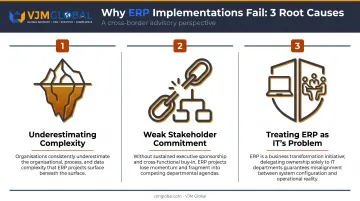
ERP success depends far more on organizational discipline and planning rigor than on which system you select — a reality that shapes every best practice covered in this guide.
Pre-Implementation Planning: Setting the Foundation
Conduct a Thorough Business Needs Assessment
Before looking at a single vendor demo, document how your business actually operates. Involve stakeholders from finance, operations, HR, and sales to map current workflows, identify inefficiencies, and define what the ERP must deliver.
Skipping this step is one of the most common causes of poor ERP fit. Without it, you're selecting software against assumptions rather than documented requirements — and assumptions are expensive to correct at go-live.
Per Deloitte's ERP strategy guidance, a sound ERP foundation requires a defined vision, a clear capability roadmap, and a meaningful data strategy — all three of which must exist before vendor conversations begin. With that foundation in place, you can define scope with confidence rather than guesswork.
Core inputs your needs assessment should produce:
- Documented workflows across all major departments
- A prioritized list of system requirements (must-have vs. nice-to-have)
- Known compliance requirements (GAAP, SOX, industry-specific)
- Clear gaps in your current system or process
Define Scope, Timelines, and Milestones Realistically
Project scope creep is a leading driver of cost overruns. Lock down scope early and calculate available capacity honestly: estimate total hours required across the project, then divide by realistic weekly availability per team member. If the math shows your go-live date is impossible before you start, adjust the timeline rather than discover it six months in.
Clean Your Data Before Migration
This step is non-negotiable. Migrating disorganized or non-compliant financial records into a new ERP corrupts reporting accuracy from day one — and the cleanup costs afterward are far higher than the cost of preparing data upfront.
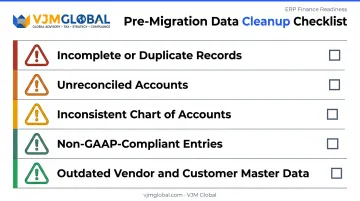
Data quality issues to address before migration include:
- Incomplete or duplicate records
- Unreconciled accounts
- Inconsistent chart of accounts structure
- Non-GAAP-compliant entries
- Outdated vendor and customer master data
VJM Global offers IT Migration Audit services covering ERP, database, and application migrations, with a focus on data integrity and adherence to GAAP and SOX standards. For US businesses managing an accounting system transition, having financial records reviewed before migration reduces the risk of post-implementation corrections that cost significantly more to fix after go-live.
Define KPIs Before Implementation Begins
Pre-defined KPIs create accountability and give you a measurable benchmark for success. Set these before go-live, not after.
Common ERP KPIs for US businesses:
- Reduction in manual processing hours
- Financial close cycle time (days to close)
- Inventory holding cost reduction
- Order fulfillment accuracy rate
- Reporting error rate improvement
Assemble the Right Internal Project Team
The ideal project team includes:
- Executive sponsor — owns decisions, removes organizational blockers
- Project lead — manages day-to-day execution and vendor coordination
- Department representatives — from finance, operations, IT, and HR
Each key team member should dedicate at minimum 25% of their working hours to the project. Assigning people who "fit it in" around other responsibilities is a reliable path to missed milestones.
How to Choose the Right ERP System for Your US Business
Key Evaluation Criteria
Don't evaluate ERP systems on features alone. The full selection framework should cover:
| Criterion | What to Assess |
|---|---|
| Industry fit | Pre-built workflows for your sector |
| Scalability | Handles growth in users, transactions, locations |
| Deployment | Cloud vs. on-premise based on your infrastructure needs |
| US compliance | Multi-state tax, GAAP-aligned financials, SOX audit trails |
| Integration | APIs with your existing CRM, payroll, and logistics systems |
| Total cost of ownership | Software + implementation + training + ongoing maintenance |
The TCO calculation matters more than the license price. NetSuite's TCO documentation identifies subscription fees, consultants, training, and temporary backfill staff as components that affect the real cost of ownership over a five-year horizon.
Evaluate the Vendor, Not Just the Software
A capable product delivered by a weak implementation partner is still a failed implementation. When assessing vendors, look at:
- Their support model during and after go-live
- Customer references from businesses of similar size and industry
- Whether they have US-based support for time-zone-aligned assistance
- Post-go-live service commitments (not just the implementation contract)
Standardize Before You Customize
Once you've selected a vendor, resist the urge to tailor the system to every existing workflow. Heavy customization reliably blows budgets and timelines — and every custom development creates maintenance burdens that slow down future upgrades.
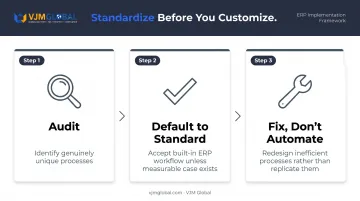
The better approach is to adapt your processes to ERP best practices, not the other way around:
- Audit first: Identify which processes are genuinely unique versus just familiar
- Default to standard: Accept the ERP's built-in workflow unless there's a measurable business case for customizing
- Fix, don't automate: If a process exists only because "that's how we've always done it," use the implementation as an opportunity to fix it, not replicate it
ERP Implementation Best Practices
Build a Strong Project Team and Secure Executive Buy-In
The single most consistent predictor of ERP success is having the right people fully committed to the project. That means two things specifically:
- Assign your most knowledgeable employees — not whoever is currently available
- Require C-suite or senior leadership to actively drive the transformation, not just approve it at the budget stage
When executive sponsors show up to project reviews, resolve cross-department conflicts, and communicate the business rationale to the organization, implementation teams move faster and with more confidence.
Choose the Right Implementation Strategy
Four main strategies exist, each with a different risk profile:
| Strategy | How It Works | Best For |
|---|---|---|
| Big Bang | All systems switch simultaneously | Small businesses with simple operations |
| Phased Rollout | Staged by department, module, or location | Most US mid-market businesses |
| Pilot | One site or team goes first, then expands | Multi-location businesses testing fit |
| Hybrid | Combines elements of phased and big bang | Complex organizations with mixed readiness |
For most US mid-market businesses, a phased rollout is the lowest-risk path. It limits operational disruption, allows course corrections between phases, and gives teams time to build competency before the next stage goes live.
Prioritize Change Management and User Adoption
Change management is consistently harder than the technical implementation. Employees who have used the same processes for years don't automatically embrace new workflows because a new system is installed.
Practical tactics that drive genuine adoption:
- Communicate the "why" early and often — not just that change is happening, but what problem it solves
- Appoint department champions who can answer peer questions and model correct usage
- Run role-specific training sessions, not generic system overviews
- Build feedback loops so users can flag problems without feeling like they're complaining
Low end-user adoption is one of the most frequently cited causes of ERP failure. Plan training as an ongoing program — not a one-time pre-launch event — with reinforcement sessions scheduled at 30 and 90 days post-launch.
Execute a Rigorous Testing and Pilot Phase
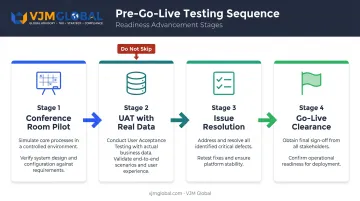
A conference room pilot (a structured dry run of your actual workflows in the new system) is the critical checkpoint before any users go live. This means:
- Using actual business data (not sample data)
- Involving front-line users who perform the tasks daily
- Logging every issue, not just the critical ones
- Resolving issues before advancing to the next phase
User acceptance testing (UAT) is the last checkpoint before go-live. Organizations that skip UAT or run it too quickly routinely discover critical gaps after launch — at the worst possible time.
What to Do After Go-Live
Most ERP benefits are not realized on go-live day. The first 90 days after go-live are critical for stabilization, training reinforcement, and catching process gaps before they compound.
A strong post-go-live support plan includes:
- A dedicated internal support resource during the stabilization period
- A clear escalation process for system issues to the vendor
- Scheduled training refreshers at 30 and 90 days post-launch
- A structured feedback mechanism to surface process gaps by department
Common ERP Implementation Mistakes to Avoid
Inadequate Planning and Scope Creep
Underestimating required work hours at the outset leads to timeline compression later — which leads to shortcuts, skipped testing, and rushed training. Adding new requirements mid-project without a formal change control process compounds the problem.
Document scope formally at the start, require written approval for any scope additions, and reassess the timeline and budget impact before accepting any change.
Neglecting Training
Even a well-configured ERP fails to deliver value when users don't know how to operate it correctly. Training needs to be:
- Role-specific — a warehouse manager and a financial controller need different training
- Hands-on — users should practice in the actual system, not watch slide presentations
- Ongoing — new hires need onboarding training; existing users need refreshers as modules expand
Pre-launch training sessions alone rarely hold up. Without role-specific practice and ongoing reinforcement, the gap between launch day and confident daily use widens fast.
Over-Customization
Training gaps are a people problem. Over-customization is a software problem — and it's just as costly. Customizations that mirror legacy processes lock in old inefficiencies and create future upgrade risk. Every custom modification must be re-evaluated — and often rebuilt — with each major system update.
The discipline required here is recognizing that many requests for customization are actually requests to preserve processes that were already suboptimal. Where the ERP's standard approach is sound, adapt the process — not the software.
Measuring ERP Success: ROI, KPIs, and Continuous Improvement
Calculating ERP ROI
ROI measurement compares pre- and post-implementation performance across your defined KPIs against total cost of ownership. TCO components include:
- Software licensing or subscription fees
- Implementation and consulting costs
- Training costs (initial and ongoing)
- Internal staff time dedicated to the project
- Ongoing maintenance and support fees
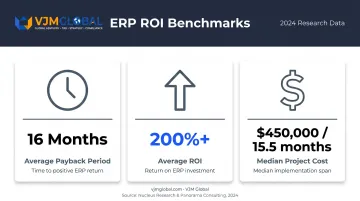
Nucleus Research's analysis of ERP deployments found an average payback period of 16 months and ROI exceeding 200% — with cost savings from eliminating legacy systems identified as the primary benefit driver. Panorama's 2024 ERP Report puts median project cost at $450,000 and median project duration at 15.5 months, which provides a planning baseline for mid-market US businesses.
Track Both Quantitative and Qualitative Metrics
Financial metrics matter, but they don't tell the full story. Track both:
Quantitative:
- Reduction in manual processing hours
- Financial close cycle (days)
- Inventory holding costs
- Order fulfillment speed and accuracy
Qualitative:
- Improved data visibility across departments
- Stronger compliance posture
- Cross-department collaboration quality
- Employee confidence in system-generated reports
ERP Optimization Is Ongoing
Those metrics only stay meaningful if you act on them. After stabilization, plan for:
- Regular system reviews (quarterly in year one)
- User adoption monitoring by department
- Phased capability expansions — new modules, additional integrations, or new locations
- Continuous feedback collection to identify process gaps before they become operational problems
Organizations that maintain this review cadence consistently report higher long-term ROI — because they catch adoption gaps and process inefficiencies before they erode the gains made at go-live.
Frequently Asked Questions
How long does ERP implementation typically take for a US business?
Timelines range from 2 to 12 months depending on business size, module count, and customization scope. Panorama's 2024 data puts the median at 15.5 months across mid-market and enterprise organizations. Phased rollouts run longer than big bang approaches but with significantly less operational disruption.
What are the most common reasons ERP implementations fail?
The top causes are lack of stakeholder commitment, inadequate pre-implementation planning, poor data quality going into migration, insufficient training, and scope creep. All are preventable with structured project governance and early investment in planning.
How much does ERP implementation cost for a US business?
Costs vary widely: smaller systems run tens of thousands, while enterprise deployments can reach millions. Panorama's 2024 benchmark puts the median at $450,000. Always calculate total cost of ownership, including training, customization, and ongoing maintenance, not just the software license.
Should US businesses choose cloud-based or on-premise ERP?
Cloud ERP is the right fit for most US mid-market businesses. It offers lower upfront costs, automatic updates, scalability, and remote access. On-premise may suit organizations with strict data sovereignty requirements or highly specialized infrastructure needs that cloud environments can't accommodate.
How can we ensure US regulatory compliance during ERP implementation?
Verify that your ERP includes US-specific compliance modules covering multi-state tax, GAAP-aligned financials, SOX audit trails, and payroll tax. Have a qualified accounting professional validate your financial and compliance data both before and after migration. VJM Global's IT Migration Audit services cover GAAP and SOX adherence for businesses navigating this process.
What is the difference between a phased rollout and a big bang ERP implementation?
A big bang approach switches all systems simultaneously, completing the transition faster but with high risk if something goes wrong. A phased rollout implements the ERP in stages by department or function: slower overall, but each phase can be corrected before the next begins, making it the lower-risk path for most businesses.