Introduction
Planning an ERP implementation without a realistic timeline is one of the most expensive mistakes a US business can make. According to Panorama Consulting's 2026 ERP Report, more than 25% of ERP projects exceed budget and nearly 25% report schedule overruns — and those numbers don't account for the operational disruption that follows.
For US business owners, CFOs, and operations leaders, a poorly planned ERP rollout carries real consequences: strained staff, disrupted operations, and costs that routinely exceed the price of the software itself.
Getting the timeline right from the start is what separates a successful rollout from a costly recovery effort. This guide breaks down what a realistic ERP implementation timeline looks like, the six phases involved, what drives variance, and the most common mistakes that push go-live dates back by weeks or months.
Key Takeaways
- ERP implementation typically takes 3 to 12 months for US small-to-mid-sized businesses, depending on complexity and deployment type
- The process follows six defined phases: discovery, design, development, testing, deployment, and post-go-live support
- Data readiness, customization scope, and management commitment are the strongest predictors of staying on schedule
- Cloud ERP deploys faster than on-premise — it skips hardware procurement
- Treat go-live as a milestone, not a finish line — the post-go-live support phase is where most ERP projects win or lose their ROI
What Is an ERP Implementation Timeline?
An ERP implementation timeline is a project management structured plan that maps every major activity — from business needs assessment and software selection through user training and go-live — against estimated durations and milestones.
This is not a software installation. It's a cross-functional business transformation that involves:
- Redesigning workflows to match ERP capabilities
- Migrating data from legacy accounting and operations systems
- Training staff across multiple departments
- Aligning stakeholders on process changes before, during, and after deployment
Why Timelines Get Underestimated
The gap between planned and actual go-live dates is persistent. Panorama Consulting's 2023 ERP Report found a median implementation duration of 15.5 months, with only slightly more than half of organizations finishing within their expected schedule.
Most businesses rely on vendor-promised timelines that only cover software configuration — not the internal complexity that drives real delays:
- Resource availability across departments during peak periods
- Data quality problems in legacy accounting and operations systems
- Employee resistance to new workflows and process changes
Your actual timeline has to account for all of this, which is why vendor estimates routinely fall short.
ERP Implementation Phases and Timeline Breakdown
According to NetSuite's implementation guidance, the full ERP lifecycle typically spans 6 to 12 months, though simpler cloud-based deployments for smaller US businesses can complete in as little as 3 months, while complex, multi-entity implementations often exceed 12 months.
Here's how the six phases sequence in practice:
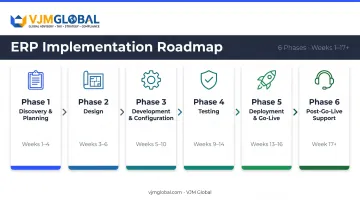
Phase 1: Discovery and Planning (Weeks 1–4)
This phase sets the foundation for everything that follows. Key activities include:
- Assembling a cross-functional project team (executive sponsor, project manager, department leads, IT representative)
- Documenting existing workflows and pain points in writing
- Defining ERP requirements as a formal document — not a verbal wish list
- Deciding between cloud vs. on-premise deployment
Cloud ERP shortens this phase by removing hardware procurement from the equation. On-premise deployments need additional time for infrastructure planning before configuration can begin.
Phase 2: Design (Weeks 3–6)
Design translates your documented requirements into a solution blueprint. It maps current processes to ERP capabilities and identifies where customization is needed. Stakeholder sign-off on a solution design document is required before any development work starts.
Skipping sign-off here is a frequent source of rework. If requirements change after development begins, the cost multiplies.
Phase 3: Development and Configuration (Weeks 5–10)
Configuration work in this phase matches the approved design, builds customizations, and initiates data cleansing. Third-party integrations — payroll systems, e-commerce platforms, CRM tools — are also built and tested here.
The most consistent bottleneck: messy legacy data. Businesses with unreconciled accounts, duplicate records, or inconsistent chart-of-accounts structures routinely hit delays. Cleaning financial records before this phase begins is the single most underrated timeline protector — and it's where outsourced accounting and reconciliation support from firms like VJM Global delivers concrete value going into migration.
Phase 4: Testing (Weeks 9–14)
Testing overlaps with development and includes:
- Unit testing — individual modules checked against requirements
- User acceptance testing (UAT) — key staff from each department validate real workflows
- Data validation — migrated records checked for accuracy and completeness
Compressing testing to meet a deadline is one of the leading causes of costly post-go-live failures. Problems that surface in UAT cost a fraction of what they cost after go-live.
Phase 5: Deployment and Go-Live (Weeks 13–16)
This phase involves the final data migration cutover and the actual system launch. Two rollout approaches exist:
| Approach | Description | Risk Level |
|---|---|---|
| Big Bang | All modules go live simultaneously on one date | Higher — all risk concentrated |
| Phased Rollout | Modules or departments deploy sequentially | Lower — disruption is contained |
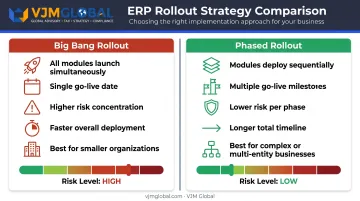
One practical note for US businesses: avoid scheduling go-live at fiscal year-end or during peak operational periods. Finance teams are already stretched thin in those windows, and adding a system transition compounds the pressure.
Phase 6: Post-Go-Live Support (Weeks 17 Onward)
The hypercare period — typically several weeks immediately following go-live — is when the implementation team remains available to resolve issues, gather user feedback, and adjust configurations.
This phase is routinely under-resourced. Many teams dissolve after deployment, treating launch day as the finish line. Post-go-live is when real-world usage surfaces edge cases, user friction, and configuration gaps — and when ERP ROI is either captured or lost.
Key Factors That Affect Your ERP Implementation Timeline
Not all implementations move at the same pace. These five variables explain most of the variance:
Company Size and Process Complexity
NetSuite's ERP statistics research puts this plainly: small and mid-sized businesses typically complete implementation in 3 to 9 months, while large enterprises require 6 to 18 months.
A 10-user business with one location and a single accounting system will move significantly faster than a 200-user company with multiple legal entities, regional operations, and consolidated reporting requirements.
Degree of Customization and Integration
Out-of-the-box cloud ERP deployments are the fastest path to go-live. Each custom module adds development time. Each third-party integration — payroll, e-commerce, CRM — adds both development cycles and additional testing rounds.
When teams insist on replicating legacy workflows inside the new system rather than adopting built-in processes, development and testing cycles compound — and timelines stretch accordingly.
Data Readiness and Migration Complexity
This is the factor most US businesses underestimate. Businesses with clean, reconciled financial records in a single system migrate faster. Those consolidating multiple legacy systems, dealing with duplicate records, or carrying years of unreconciled data face significantly longer timelines.
Addressing data quality gaps before the project kicks off — not during — is one of the highest-leverage steps a US business can take to protect its go-live date.
Management Commitment and Internal Resource Availability
ERP projects stall most predictably when key staff are pulled between project tasks and daily operations. Without protected time and visible executive sponsorship, decisions slow down, testing gets compressed, and training gets cut.
An active executive sponsor who removes blockers and holds the team accountable is among the strongest predictors of on-schedule delivery.
Cloud vs. On-Premise Deployment
Cloud ERP eliminates hardware procurement and infrastructure setup, which shortens implementation timelines by weeks to months. The vendor manages the infrastructure. Your team focuses on configuration, not server setup.
On-premise implementations require dedicated IT infrastructure work before configuration begins. For US SMBs without a dedicated internal IT team, cloud deployment is the practical default — it removes infrastructure complexity from the project entirely.
Quick comparison:
| Factor | Cloud ERP | On-Premise ERP |
|---|---|---|
| Infrastructure setup | Vendor-managed | Internal IT required |
| Typical timeline | Shorter (weeks saved) | Longer (months added) |
| Best fit | SMBs, distributed teams | Large enterprises with IT staff |
| Upfront complexity | Low | High |
Common Mistakes That Derail ERP Timelines
Rushing Through the Planning Phase
Many US businesses move from vendor selection directly into configuration without fully documenting requirements or mapping current processes. The gaps surface mid-project, trigger scope changes, and cause expensive rework.
Dedicating two to four weeks to discovery — before any configuration begins — typically prevents far more rework than it costs.
Migrating All Historical Data Without a Strategy
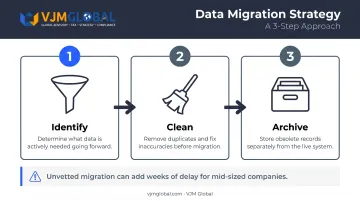
The assumption that everything from the old system belongs in the new one is a significant source of delays. In practice:
- Identify what data is actively needed going forward
- Clean it for duplicates and inaccuracies before migration begins
- Leave obsolete records in an archived state, not in the live system
For mid-sized companies, unvetted data migration can add weeks to the timeline — and the larger the dataset, the steeper the rework costs.
Treating Training as an Afterthought
When training is compressed or scheduled too close to go-live, staff arrive underprepared. The result is slower operations, higher support burden, and user resistance that can undermine adoption for months.
Training should happen in a sandbox environment that mirrors the live configuration — ideally two to three weeks before the cutover date, not the week of.
Confusing Go-Live With Project Completion
Deploying the system is not finishing the project. The post-go-live period is when the organization starts using the system under real conditions — and that's when edge cases, configuration gaps, and usability issues surface.
Teams that dissolve immediately after launch leave these problems unresolved, undermining much of the value the implementation was meant to deliver.
When to Reconsider or Adjust Your ERP Timeline
Sometimes the right call is to push the go-live date back. Three situations warrant that conversation:
The timeline is already unrealistic. If key stakeholders cannot commit protected time, if data quality issues are more severe than initially assessed, or if the organization is managing another major change simultaneously (a merger, rapid hiring, a system consolidation), a delayed go-live is always preferable to a failed one.
A phased rollout makes more sense. Companies with complex operations, multiple business units, or high operational risk — manufacturing, healthcare, logistics — are better served by rolling out ERP by module or department rather than all at once. The overall timeline is longer, but each phase builds on lessons from the last, and the risk at any single moment is contained.
ERP isn't the right tool yet. Businesses without basic process documentation, unstandardized workflows, or insufficient operational complexity may not yet benefit from a full ERP deployment. Simpler accounting or operations tools may serve their needs better until processes are more defined.
Signs that ERP readiness is lacking:
- Disconnected manual processes with no clear ownership
- Inability to define consistent requirements across teams
- No standardized chart of accounts or financial structure
Frequently Asked Questions
What are the 4 pillars of ERP?
The four pillars of ERP are generally considered to be finance and accounting, human resources, supply chain and operations, and customer relationship management. Most ERP platforms are architected around these core functional areas, with additional modules built on top.
How long does ERP implementation take for a small US business?
Small US businesses with simpler processes and fewer users can implement an out-of-the-box cloud ERP in as little as 2–3 months. Businesses with more complex workflows or multiple integrations typically need 6–12 months to complete a full deployment.
What is the difference between Big Bang and phased ERP implementation?
Big Bang deploys all ERP modules simultaneously on a single go-live date — faster but higher risk. Phased implementation rolls out modules or departments sequentially, extending the overall timeline but reducing disruption and allowing early phases to inform later ones.
What are the most common reasons ERP projects fail or go over budget?
The most frequently cited causes are inadequate planning, poor data migration preparation, insufficient user training, lack of executive sponsorship, and unrealistic timeline estimates. Panorama Consulting's research consistently identifies underestimated project staffing as a leading budget overrun driver.
Does cloud ERP implementation take less time than on-premise ERP?
Yes. Cloud ERP is generally faster because it eliminates hardware procurement and infrastructure setup, and because the vendor manages the underlying environment. On-premise implementations add weeks or months for IT configuration before any business setup can begin.
How does data quality affect the ERP implementation timeline?
Poor data quality is one of the leading causes of ERP delays. Cleaning, deduplicating, and standardizing data from legacy systems before migration begins is essential. Organizations that start migration with unreconciled records regularly see delays of weeks or months.