The stakes are high. Gartner projects that by 2027, more than 70% of recently implemented ERP initiatives will fail to fully meet their original business-case goals. That figure isn't a software indictment — it reflects what happens when organizations treat ERP as an IT project rather than a business transformation program.
This guide walks US firms through the complete implementation process, from readiness assessment to post-launch validation, including the practices that consistently separate successful deployments from expensive failures.
Key Takeaways
- ERP implementation follows defined phases — planning through go-live — and skipping any one consistently drives project failures
- Executive sponsorship is non-negotiable; implementations without active C-suite commitment consistently underperform
- Data quality is the most common bottleneck — clean financial and operational records must be ready before configuration begins
- US firms must account for GAAP compliance, state-level tax requirements, and industry-specific regulations during configuration
- Post-go-live work — hypercare, KPI tracking, and user adoption — determines whether the system delivers its promised ROI
What Is ERP Implementation and Why Does It Matter for US Firms?
ERP implementation is the end-to-end process of selecting, configuring, deploying, and adopting an Enterprise Resource Planning system across a business. A fully deployed ERP centralizes finance, operations, supply chain, HR, and customer management into a single integrated platform — replacing the disconnected spreadsheets, legacy tools, and siloed databases that slow most growing businesses down.
For US firms, the business case is clear. The worldwide ERP software market reached $66 billion in 2024, growing 11.3% year-over-year, driven by cloud adoption and AI integration.
Panorama's 2026 ERP Report — based on 170 organizations surveyed between January 2025 and January 2026 — found that more than one-quarter of projects ran over budget and nearly one-quarter ran over schedule. The most common cause of those overruns wasn't software defects. It was organizational issues:
- Poor governance and unclear decision-making authority
- Resistance to change at the department level
- Inadequate process redesign before go-live
That distinction matters. Firms that succeed treat ERP implementation as a business transformation effort — one where people, process, and technology must move together.
Before You Begin: ERP Implementation Prerequisites for US Firms
Readiness work done before configuration begins determines whether the project finishes on time and on budget. These are the non-negotiables.
Audit Current Systems and Define Scope
Document existing processes across finance, procurement, inventory, HR, and customer management before selecting software. Identify inefficiencies, redundancies, and data gaps. Then, leadership must align on what the ERP actually needs to achieve — which departments will be automated, which KPIs will be tracked, and what success looks like at 6 and 12 months post-launch.
Without that alignment, scope creep becomes inevitable.
Financial and Data Readiness
Your chart of accounts, historical financial records, and operational data must be clean and structured before migration begins. Firms carrying fragmented or inconsistent bookkeeping face significantly longer data preparation timelines — in some cases adding months to the project before configuration can even start.
For US firms with messy books, bringing in an accounting outsourcing partner before implementation — one that handles chart of accounts structuring, month-end close management, and GAAP-compliant recordkeeping — can compress the data preparation phase considerably. VJM Global, for instance, works with US businesses specifically on financial data clean-up ahead of system migrations.
Team and Resource Requirements
Identify your core implementation team before kickoff:
- Project manager — owns timeline, budget, and cross-team coordination
- Department leads — finance, operations, and IT representation is essential
- ERP vendor or certified implementation partner — don't attempt a mid-market or enterprise deployment without one
- Executive sponsors — required for decisions on staffing trade-offs, budget, and process changes
Deloitte's ERP implementation guidance is direct on staffing: team members who spend less than 25% of their time on the project will fall behind. Named owners and backfill plans must be in place before kickoff.
US-Specific Compliance Checkpoints
Before configuration begins, verify your ERP can support:
| Compliance Area | Who It Applies To |
|---|---|
| GAAP reporting (FASB Codification) | All US firms |
| State sales tax (post-Wayfair) | Any firm with multi-state economic nexus |
| SOX / ICFR controls | Public companies |
| HIPAA audit controls | Healthcare organizations |
| FDA 21 CFR Part 11 | Life sciences firms |
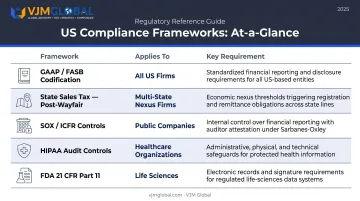
Each of these frameworks has direct configuration implications — from chart of accounts structure to user access controls and audit trail requirements.
Step-by-Step ERP Implementation Guide for US Firms
The process follows a defined sequence. Shortcuts — particularly in data migration and testing — routinely cause failures that are far more expensive to fix after go-live than before.
Phase 1: Software Selection and Vendor Evaluation
ERP selection must be driven by business requirements, not vendor reputation. Evaluate systems on:
- Functional fit for your industry and workflows
- Integration capabilities with existing tools (payroll, CRM, e-commerce)
- Total cost of ownership — licensing, implementation, and ongoing support
- Scalability as your business grows
- Deployment model — cloud, on-premise, or hybrid
Panorama's 2026 report offers a practical size reference for matching your revenue to the right tier:
| Tier | Example Systems | Revenue Range |
|---|---|---|
| Tier I | SAP S/4HANA, Oracle Fusion Cloud | $750M+ |
| Upper Tier II | Microsoft Dynamics 365, IFS Cloud, Epicor Kinetic | $250M–$750M |
| Lower Tier II | NetSuite, Acumatica, SYSPRO | $10M–$250M |
Phase 2: System Configuration and Customization
Configuration aligns the ERP to your company's actual workflows. This includes:
- Chart of accounts and cost center setup
- User roles and permissions
- Module-specific settings (finance, supply chain, CRM)
- Compliance controls (segregation of duties, audit trails)
Avoid over-customization. Excessive custom code inflates implementation costs and creates long-term maintenance burden. Adopt system-standard workflows wherever possible, and reserve customization for genuine business-critical requirements.
Phase 3: Data Migration
Data migration is typically the most time-consuming phase. The sequence:
- Audit existing data — identify duplicates, missing records, formatting inconsistencies
- Clean and structure records for the new system
- Run test migrations — at least two full runs with validation checks before live cutover
- Establish data governance policies for ongoing accuracy
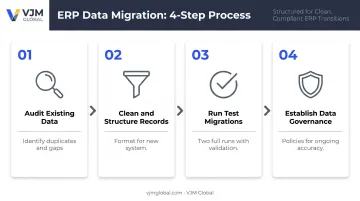
Panorama identifies redundant data, inaccurate product codes, duplicated records, and missing critical spreadsheet data as the most common migration problems. Poor data quality discovered mid-migration is the most frequent cause of implementation delays.
Phase 4: Integration with Existing Systems
Most US firms need their ERP to connect with:
- E-commerce platforms
- Payroll providers
- CRM systems
- Bank feeds and financial reporting tools
Every integration must be tested thoroughly and documented. Broken integrations discovered after go-live are among the most disruptive post-launch problems — and the hardest to unwind once users are already operating in the new system.
Phase 5: Testing and User Acceptance Testing (UAT)
Integration testing catches technical failures; UAT catches usability failures. Both are non-negotiable. The testing sequence:
- Functional testing — validate individual modules work correctly
- End-to-end process testing — test full workflows (order-to-cash, procure-to-pay)
- UAT — actual department users validate the system supports their daily work
Issues found during UAT cost far less to fix than issues found after go-live. Compressing this phase to hit a launch date is one of the most common — and most expensive — decisions firms later regret.
Phase 6: Training, Go-Live, and Post-Launch Validation
Training must be role-specific. Finance teams, operations staff, and managers need different curricula — generic system training produces low adoption.
Once training is complete, your go-live strategy determines how much risk you carry into launch day:
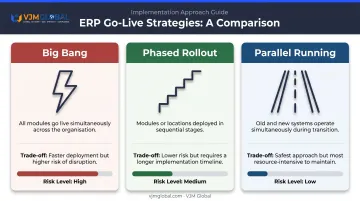
- Phased rollout — one department or location at a time; lower risk, longer timeline
- Big bang — all modules live simultaneously; faster but higher risk
- Parallel running — old and new systems operate simultaneously; safest but resource-intensive
Post-launch, confirm data accuracy, workflow automation performance, and integration stability before declaring the system fully operational. Set a formal 90-day review checkpoint — most latent issues surface within the first three months, and catching them early limits downstream damage to reporting and operations.
Common ERP Implementation Problems and How to Fix Them
Most ERP projects hit at least one of these problems — often before anyone realizes the damage is done. Spotting them early, and knowing the specific fix, is what separates a troubled rollout from a successful one.
Scope Creep and Feature Expansion Mid-Project
Stakeholders start requesting new features after configuration has begun — extending timelines and inflating budgets. This typically traces back to incomplete requirements gathering and no formal change control process in place.
Fix: Establish a change control board before implementation begins. Every change request gets evaluated against timeline and budget impact before approval. No exceptions.
Data Migration Failures and Inconsistencies
Migrated data arrives with duplicates, formatting errors, or missing records — and financial reports start producing wrong outputs from day one. The root cause is almost always the same: data wasn't audited before migration, and test runs were skipped to save time.
Fix: Run at least two full test migrations with validation checks before live cutover. Assign a dedicated data steward to own data quality throughout the project.
Low User Adoption After Go-Live
Employees revert to spreadsheets or legacy tools, which undermines the ERP's value and corrupts data integrity. Training delivered too early — or too generic — is the usual culprit, compounded by change management being treated as an afterthought.
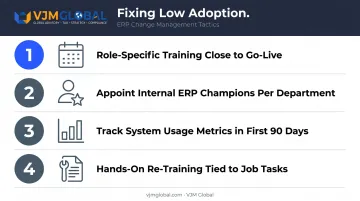
Fix:
- Deliver role-specific training close to go-live (not six weeks before)
- Appoint internal ERP champions in each department
- Track system usage metrics in the first 90 days
- Address resistance with hands-on re-training tied to specific job tasks
ERP Implementation Best Practices for US Firms
Secure Executive Sponsorship Early
ERP projects require decisions that only leadership can authorize — staffing trade-offs, budget reallocation, and process changes that affect every department. Panorama's analysis of more than 30 ERP-related lawsuits found that change management failures were a contributing factor in every case. Lack of executive buy-in is one of the top failure factors.
Prioritize Process Redesign Over Customization
Many US firms replicate broken legacy processes in the new ERP. That's one of the most expensive mistakes in implementation. Use the project as an opportunity to adopt system-standard workflows, reserving customization only for genuine business-critical requirements that the standard system cannot meet.
Plan for Total Cost of Ownership
Budget beyond licensing fees. NetSuite's TCO framework breaks ERP costs into three categories:
- Purchase costs — software licenses or subscriptions, hardware/infrastructure
- Implementation costs — consultant fees, customization, integration, internal resources, data migration, training, testing
- Ongoing operating costs — maintenance, support, upgrades, continuous training
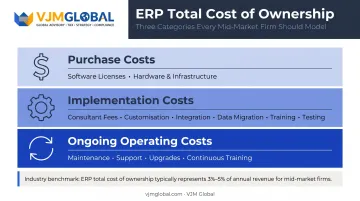
For companies under $1 billion in annual revenue, NetSuite cites a midsize benchmark of approximately 3%–5% of annual revenue for total ERP ownership over the system's lifetime. Cloud-based ERP generally carries lower upfront costs than on-premise deployments.
Build for Post-Implementation Continuity
Go-live is a milestone, not a finish line. Firms with complex multi-entity financial structures or cross-state compliance requirements need ongoing support to ensure ERP-generated financial data meets US reporting standards.
Build continuity into your plan from day one:
- Establish a documented support process before go-live
- Schedule recurring system health reviews (quarterly at minimum)
- Assign a named owner for ongoing ERP optimization
US firms managing GAAP compliance, state-level tax obligations, or SOX controls often need specialized financial oversight after go-live. VJM Global provides dedicated financial advisory services to help firms maintain data accuracy and compliance as the business evolves.
Frequently Asked Questions
What is ERP implementation?
ERP implementation is the full process of deploying an Enterprise Resource Planning system — encompassing software selection, configuration, data migration, integration, training, and go-live to centralize and automate core business processes across finance, operations, HR, and supply chain.
What are the 7 stages of ERP implementation?
The commonly referenced stages are: planning, requirements gathering, system design and configuration, data migration, testing, training and go-live, and post-implementation support. Different frameworks may combine or label stages differently, but the core sequence remains consistent across vendors.
What are the main ERP implementation approaches?
Three approaches dominate:
| Approach | How It Works | Trade-off |
|---|---|---|
| Big Bang | All modules go live simultaneously | Faster, but higher risk |
| Phased Rollout | Modules or locations deployed in stages | Lower risk, longer timeline |
| Parallel Running | Old and new systems operate side by side | Safest, but most resource-intensive |
Most mid-market firms choose a phased approach.
How long does ERP implementation take for a US firm?
NetSuite puts the typical ERP implementation lifecycle at 6 to 12 months depending on complexity. Panorama's 2026 report found a median project timeline of 9 months across 170 organizations. Data migration and testing are the most common causes of delays regardless of company size.
What are the most common reasons ERP implementations fail?
The top factors: poor planning and undefined scope, inadequate executive sponsorship, low user adoption, underestimated data complexity, and the wrong implementation partner. Panorama's research consistently shows that most failures are process-related, not software-related.
How much does ERP implementation cost for a US business?
Costs vary by system and company size, but a reliable benchmark: total ERP ownership typically runs 3%–5% of annual revenue for companies under $1 billion, covering licensing, implementation fees, data migration, training, and maintenance. Cloud-based ERP generally carries lower upfront costs than on-premise deployments.