Introduction
Every time a UK business receives a supplier invoice showing VAT charges, a compliance check should follow. The number on the invoice must be real — issued by HMRC, currently active, and matched to the right business.
The stakes are straightforward: VAT Notice 700 confirms that a valid VAT invoice is the standard evidence required to reclaim input tax. Accept an invoice with a false or cancelled VAT number, and that reclaim becomes indefensible. In fraud cases, it can trigger HMRC scrutiny of your entire supplier chain.
According to HMRC's Measuring Tax Gaps 2025 edition, the UK VAT gap for 2023–2024 reached £8.9 billion — equivalent to 5.0% of theoretical VAT liability. False invoicing contributes directly to that gap.
The sections below walk you through three verification methods, how to interpret results, and the right steps when a number doesn't check out.
Key Takeaways
- A valid UK VAT number is 9 digits, optionally prefixed with GB (e.g., GB123456789)
- The fastest verification route is the official HMRC checker at gov.uk/check-uk-vat-number
- A name or address mismatch is a red flag — contact the supplier before processing any VAT reclaim
- Accepting unverified invoices exposes businesses to denied reclaims and potential HMRC penalties
- Foreign businesses managing UK VAT compliance remotely should work with a specialist tax advisor to avoid costly HMRC penalties
Why Checking a UK VAT Registration Number Matters
Reclaiming input VAT is not automatic. Under VAT Notice 700, a VAT-registered business must hold a valid VAT invoice as evidence — and that invoice must show a genuine VAT registration number belonging to the supplier named on it.
Number verification is a direct financial issue, not a procedural formality.
The Fraud Risk
HMRC's internal VAT Fraud manual identifies false invoicing as a specific fraud vector, and explicitly warns that a VAT number appearing on an invoice may be entirely fabricated. In missing trader fraud scenarios, HMRC can deny input tax reclaims to businesses that knew, or should have known, their transactions were connected to fraudulent supply chains.
The consequence is straightforward: if you process a VAT reclaim based on an invalid number, you bear the burden of proving you acted in good faith.
The Cross-Border Angle
Foreign companies selling goods or services in the UK must register for VAT from their first taxable supply. The registration threshold does not apply to non-established businesses, so overseas buyers sourcing from UK suppliers carry the same verification obligations as domestic ones.
Key points for cross-border buyers:
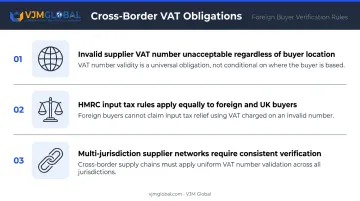
- An invalid supplier VAT number is not acceptable regardless of where the buyer is based
- HMRC's input tax reclaim rules apply to foreign buyers in the same way as UK-registered businesses
- Supplier networks spanning multiple jurisdictions require consistent verification — not just spot checks
VJM Global supports 250+ UK businesses on ongoing compliance, and cross-border supplier verification is one of the most common issues that arises for clients managing multi-jurisdiction supply chains.
What You Need Before You Verify
The Two Pieces of Information
To use the official HMRC online checker, you need:
- The supplier's VAT number — taken directly from their invoice or documentation
- Your own UK VAT registration number — required to generate a verified proof of the check
If you do not hold your own UK VAT number, the online checker's proof function is unavailable. The HMRC helpline and manual cross-checks (covered in the next section) are your alternatives.
What a Valid VAT Number Looks Like
| Feature | Detail |
|---|---|
| Digit count | Always 9 digits |
| Prefix | Optionally preceded by "GB" (e.g., GB123456789) |
| Branch/group suffix | Some group registrations carry an additional 3-digit suffix |
| Format in systems | "GB" and spaces are stripped before validation |
Common confusions to avoid:
- A UTR (Unique Taxpayer Reference) is a 10-digit number — not a VAT number
- A Companies House number is typically 8 digits (or 2 letters followed by 6 digits) and will not validate on the HMRC VAT checker
- Neither a UTR nor a company registration number will validate on the HMRC VAT checker
Supporting Documents to Have Ready
Before running any check, pull together:
- The invoice showing the VAT number and claimed VAT amount
- The supplier's registered business name as it appears on the invoice
- Their stated business address
You'll need all three to cross-reference with the checker's output.
How to Check a UK VAT Registration Number: 3 Methods
There are three practical ways to verify a UK VAT number. Start with the fastest; escalate if needed.
Method 1: HMRC Online VAT Checker
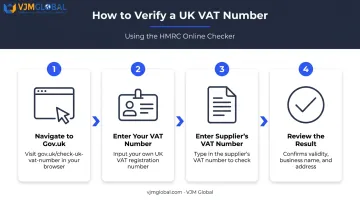
The official HMRC VAT checker at gov.uk/check-uk-vat-number is the most authoritative option. It returns whether the number is valid and shows the registered business name and address.
Steps:
- Navigate to gov.uk/check-uk-vat-number
- Enter your own VAT registration number when prompted
- Enter the supplier's VAT number you want to verify
- Submit and review the result: the checker displays validity status, registered business name, and address
What it does and does not do:
| Confirms | Does Not Confirm |
|---|---|
| Current validity and registered business details | Registration status during past periods |
| Generates a dated proof record of the check | Business name searches (number only) |
Method 2: HMRC VAT Helpline
For those without online access, or who need verbal confirmation, HMRC's VAT helpline can verify a number directly.
- UK callers: 0300 200 3700
- From abroad: +44 2920 501 261
- Hours: Monday to Friday, 8am to 6pm (closed bank holidays)
Call with the VAT number and associated business name ready. If you need written confirmation, request a follow-up letter from the agent. Wait times vary. Treat this as a backup option, not your starting point.
Method 3: Manual Check Against Invoice and Companies House
Before using any official tool, a quick manual review catches formatting errors before you escalate.
Steps:
- Count the digits on the invoice — should be exactly 9 (with or without "GB" prefix)
- Check the supplier's website or email signature for the same number
- Search the company on Companies House to verify the legal name and registered address match the invoice
- If anything looks inconsistent, escalate to the HMRC checker or helpline
Note: Companies House does not display VAT registration numbers, so use it only to cross-check the legal name, registered office, and company status against the invoice. It screens for obvious discrepancies but does not substitute for official HMRC verification.
How to Interpret Your VAT Number Check Results
Result: Valid — Name and Address Match
The supplier is currently registered for VAT, and the details align with their invoice. You can treat the invoice as a legitimate VAT document for reclaim purposes. Keep a record of the check date, result, and the checker's name for your audit file.
Result: Valid — But Name or Address Does Not Match
A mismatch does not automatically indicate fraud. Common explanations include:
- The invoice uses a trading name rather than the legal registered name
- The business has recently moved and updated its HMRC records
Action: Contact the supplier directly to clarify the discrepancy. Document the conversation and their response. Do not process the VAT reclaim until the mismatch is resolved and recorded.
Result: Invalid
The number does not appear in HMRC's register. This means HMRC has no record of this business being VAT-registered.
Action:
- Do not process any VAT reclaim on this invoice
- Contact the supplier immediately and request a corrected invoice with a valid number
- If the supplier cannot provide a valid number, report the discrepancy to HMRC's VAT fraud reporting service
Result: Previously Valid but Deregistered
A business can cancel its VAT registration, and VAT Notice 700/11 is clear on what follows. From the cancellation date, the business must stop issuing VAT invoices. Issuing one after deregistration may result in a financial penalty.
As a buyer, you cannot reclaim VAT on purchases made after the supplier's registration was cancelled.
Action:
- Request a corrected invoice without VAT charged
- If the invoice has already been processed, seek professional advice on how to handle the adjustment
Common Mistakes and Best Practices
Mistakes That Create Compliance Gaps
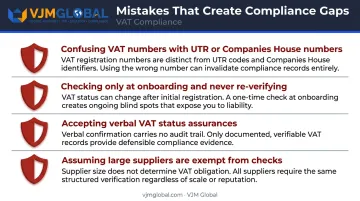
- Confusing a VAT number with a UTR or Companies House number — these are different identifiers with different digit counts and different purposes
- Checking once at supplier onboarding and never again — VAT registrations can be cancelled, so a number valid in January may not be valid in October
- Taking verbal assurances of VAT status as sufficient — if it is not verified through HMRC, it is not verified
- Assuming large or well-known suppliers are exempt from checking — size is not a substitute for verification
Best Practices for Ongoing Compliance
- Build VAT number checks into supplier onboarding checklists as a condition before any invoice is processed
- Re-verify numbers at least annually for regular suppliers, especially high-value ones
- Keep a verification log recording the date, VAT number checked, result returned, and who ran the check
- Confirm all VAT invoices show the 9-digit registration number before filing each VAT return
For businesses managing large UK supplier networks, or for foreign companies handling UK VAT compliance from overseas, these checks can quickly outpace what internal teams can manage consistently. VJM Global works with over 250 UK businesses on exactly this type of ongoing compliance management, helping them build systematic verification processes rather than relying on reactive, one-off checks.
Frequently Asked Questions
What is VAT registration in the UK?
VAT registration is the process by which HMRC assigns a business a unique 9-digit VAT number (prefixed GB), enabling it to charge and reclaim VAT. UK-established businesses must register once taxable turnover exceeds £90,000 (effective 1 April 2024); non-UK businesses must register from their first taxable supply in the UK, with no turnover threshold.
Who has a VAT number in the UK?
Any business registered for VAT with HMRC holds one — including UK sole traders, partnerships, and limited companies that exceed the registration threshold, as well as foreign businesses making taxable supplies in the UK. Non-established businesses have no threshold exemption.
How do I check if a UK VAT number is valid online?
Use the official checker at gov.uk/check-uk-vat-number. You will need your own VAT registration number and the number you want to verify — results come back immediately, showing the registered business name and address.
What should I do if a supplier's VAT number comes back as invalid?
Do not reclaim VAT on that invoice. Contact the supplier immediately to request a corrected invoice with a valid number. If they cannot provide one, consider reporting the matter to HMRC's VAT fraud reporting service.
Can I check a UK VAT number if I am not VAT-registered myself?
The online checker's proof function requires your own VAT number. If you are unregistered, call the HMRC VAT helpline on 0300 200 3700, or cross-reference the invoice against Companies House records as a starting point.
How long does it take to receive a UK VAT registration number after applying?
HMRC advises contacting the VAT Registration Service if you have not heard back after 40 working days. Processing may take longer if additional information is needed, but businesses can account for VAT from their effective registration date even before the number arrives.