The responsibility sits with the buyer, not the supplier. That makes verification a non-negotiable step in any accounts payable workflow.
This guide covers what a UK VAT number looks like, how to verify it using three official methods, how to interpret the results, and what to do when something doesn't add up.
Key Takeaways
- The HMRC online VAT checker is the fastest, free, official verification method, and no login is required
- UK VAT numbers follow the format GB + 9 digits, with an XI prefix used for Northern Ireland registrations
- An invalid result doesn't automatically mean fraud; typos, new registrations, and deregistered businesses can all trigger a "not found" response
- Never submit a VAT reclaim on an unverified invoice; pause the transaction and investigate first
- Keep documented evidence of every verification check for at least 6 years to satisfy HMRC's record-keeping requirements
What Is a UK VAT Number?
A UK VAT number is a unique identifier issued by HMRC to businesses registered for VAT. Businesses must register once their taxable turnover exceeds £90,000 in any 12-month period (the threshold increased from £85,000 in April 2024). Voluntary registration below that threshold is also permitted.
Format Variants
UK VAT numbers come in three formats depending on business type and location:
| Format | Example | When Used |
|---|---|---|
| Standard GB + 9 digits | GB123456789 | Most UK-registered businesses |
| XI + 9 digits | XI123456789 | Northern Ireland traders dealing with EU customers (goods only) |
| GB + 9 digits + 3-digit suffix | GB123456789001 | VAT group or divisional registrations |
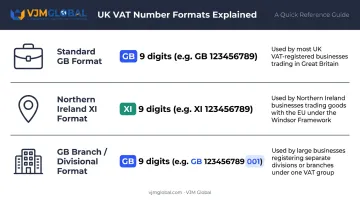
One distinction matters post-Brexit: Great Britain (GB) numbers no longer appear on the EU's VIES system. Northern Ireland retains the XI prefix for goods movements between Northern Ireland and EU member states under the Northern Ireland Protocol.
Where to Find a Supplier's VAT Number
Under HMRC VAT Notice 700, a supplier's VAT registration number must appear on every full VAT invoice. You'll also typically find it on purchase orders, contracts, and a business's official website. An invoice missing the VAT number is not a valid VAT invoice, meaning you cannot reclaim input tax from it. That makes knowing how to verify a number — not just locate it — a practical necessity.
Why Verifying a UK VAT Number Matters
Input Tax Claims and Compliance Risk
HMRC's VAT Input Tax Manual states that a business must hold a VAT invoice complying with Regulation 14 as acceptable evidence for input tax deduction. If that invoice carries an invalid or missing VAT number, the reclaim fails — and HMRC may initiate a compliance check.
Penalties for inaccuracies are behaviour-based:
| Behaviour | Penalty Range |
|---|---|
| Careless (unprompted) | 0–30% of tax owed |
| Deliberate | 20–70% |
| Deliberate and concealed | 30–100% |
Taking reasonable care — including verifying VAT numbers — reduces or eliminates penalties entirely.
The VAT Gap and Fraud Risk
HMRC's 2025 Measuring Tax Gaps publication estimates the UK VAT gap at £8.9 billion for 2023–2024, representing 5.0% of theoretical VAT liability. This covers the full range of non-compliance, from honest errors to deliberate fraud.
That fraud exposure is where the Kittel principle becomes critical: if the only reasonable explanation for the circumstances surrounding a transaction was a connection to VAT fraud, the "should have known" test is met. Verifying a supplier's VAT number — and keeping a record of that check — is a documented defence against that standard.
Cross-Border and Reverse Charge Transactions
Correctly applying the domestic reverse charge or zero-rating cross-border B2B supplies depends on both parties holding valid, verified VAT numbers. The wrong prefix alone can trigger the wrong VAT treatment. Key scenarios where this matters:
- UK–EU B2B supplies: Zero-rating requires a verified GB-prefix number on the UK side
- Northern Ireland transactions: XI-prefix numbers apply under the Windsor Framework, not GB
- Reverse charge supplies: Both buyer and seller must hold valid, matched VAT registrations
Getting the prefix right is not a technicality — it determines whether the supply is taxable, zero-rated, or subject to reverse charge.
How to Verify a UK VAT Number: Three Methods
Method 1: HMRC Online VAT Checker (Use This First)
The official, free HMRC tool validates any UK VAT number in real time and returns the registered business name and address if the number is valid.
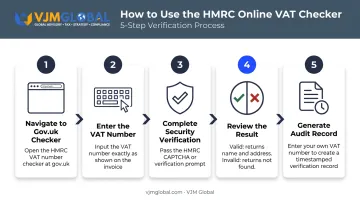
Steps:
- Go to gov.uk/check-uk-vat-number — this redirects to the live checker at
tax.service.gov.uk - Enter the VAT number exactly as it appears on the invoice
- Complete any security verification and submit
- Review the result: a valid number returns the registered business name and address; an invalid number returns a "not found" message
- If you are VAT-registered, enter your own VAT number to generate a timestamped record of the check — useful for audit trail purposes
What to know about this tool:
- Free, available around the clock, no account required
- Shows current registration status only (no history)
- Subject to occasional scheduled maintenance windows
- Accepts VAT numbers with or without the "GB" prefix; enter XI numbers exactly as issued for Northern Ireland registrations
- Known behaviour: UK-registered traders with non-UK addresses may return an HMRC address — this is a confirmed system quirk, not an invalid registration
Method 2: HMRC VAT Helpline (For Disputed or Unclear Results)
When the online checker returns an unexpected result, or if online access is unavailable, call the HMRC VAT enquiries helpline.
Contact details (from GOV.UK):
- UK: 0300 200 3700
- Outside UK: +44 2920 501 261
- Hours: Monday to Friday, 8am to 6pm (closed bank holidays)
Steps:
- Have your own VAT number ready — HMRC may ask for it
- Provide the supplier's VAT number and request confirmation of its validity
- Document the date, time, and name of the agent you spoke with
Privacy restriction: HMRC will not disclose a third party's full registered details to a caller. They can confirm whether a number matches a given name, but won't provide the name unprompted.
Method 3: EU VIES (For Northern Ireland XI Numbers and EU Suppliers)
The EU's VAT Information Exchange System applies when checking Northern Ireland XI numbers in a cross-border context, or when verifying VAT numbers from EU member states.
Steps:
- Visit the VIES portal on the European Commission's website
- Select "XI – Northern Ireland" from the country drop-down for Northern Ireland numbers, or the relevant EU member state for EU suppliers
- Enter the VAT number and submit
Critical point: GB-prefix UK VAT numbers have not been on VIES since 1 January 2021. VIES is only useful for XI (Northern Ireland) numbers and EU member state VAT numbers — it cannot validate standard GB registrations.
How to Interpret Your Verification Results
Result: Valid — Name and Address Match
This is the expected outcome. You're entitled to reclaim input VAT, as long as the invoice includes all required elements under HMRC VAT Notice 700:
- Sequential invoice number
- Date of issue and tax point
- Supplier name, address, and VAT registration number
- Customer name and address
- Description of goods or services
- Quantity, unit price, VAT rate, and net amount per line
- Gross total excluding VAT, applicable cash discount rate, and total VAT in sterling
Result: Valid — But Name or Address Doesn't Match
The number exists, but the registered details differ from what's on the invoice. Investigate before proceeding. Common explanations include:
- A recent business name change not yet updated on the invoice
- A subsidiary trading under a different name
- A fraudulent or incorrect invoice
Request clarification from the supplier in writing and document all correspondence.
Result: Invalid or Not Found
| What you see | Likely cause | What to do |
|---|---|---|
| "Invalid / Not Recognised" | Formatting error or incorrect prefix | Re-enter carefully; try with and without "GB" |
| "No Record Found" | Typo, newly issued number, or deregistered business | Check the number with the supplier; allow time if recently registered |
| HMRC address showing for overseas trader | Known system behaviour | Registration is still valid — proceed normally |
On newly issued numbers: The GOV.UK checker page notes it cannot be used if the VAT number has not yet been received or registration is still pending. If your supplier has very recently registered, allow some time before concluding the number is invalid.
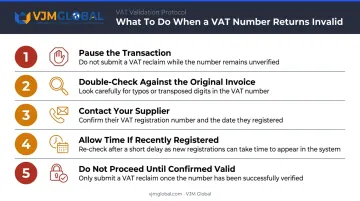
Structured response when the result is invalid:
- Pause the transaction — do not submit a VAT reclaim
- Double-check the number against the original invoice for typos
- Contact the supplier and ask them to confirm their VAT registration number and date
- If recently registered, re-check after a short delay
- If the number remains unverifiable, do not proceed until it is confirmed
Common Mistakes to Avoid
These three errors come up repeatedly in practice — and each is avoidable with a small process change:
- Wrong prefix or digit count: Entering "GB" for a Northern Ireland trader (who uses "XI"), or submitting 10 digits when only 9 are valid, returns an invalid result on a legitimate registration. Also confirm you haven't confused a VAT number with a UTR (Unique Taxpayer Reference) — a UTR is a 10-digit self-assessment code with no role in VAT reclaims.
- Treating a one-time check as permanent: Suppliers can deregister voluntarily, and HMRC can cancel registrations without notice. A check from three years ago offers no defence in a current audit. Re-verify after any gap in trading (12+ months), when a supplier flags a registration change, or before a large payment.
- Acting on an invalid result without investigating first: Refusing an invoice or dropping a supplier before checking for a system delay or a simple typo can damage a sound business relationship. Look into the cause before taking action.
Best Practices for Ongoing VAT Number Compliance
Building verification into standard processes, rather than treating it as a one-off task, is what HMRC's Guidelines for Compliance GfC8 (published September 2024) actually expects. The guidance specifically recommends recording VAT registration numbers in supplier master data and carrying out appropriate due diligence for new suppliers.
Practical steps to embed in your workflow:
- Verify every new supplier's VAT number before the first purchase and save a screenshot or printout alongside the supplier record
- Re-verify at defined intervals — after 12+ months without a transaction, after any supplier-notified change, and before material payments
- Keep all verification evidence for at least 6 years, consistent with HMRC VAT Notice 700/21's record-keeping requirement
- Document the date and outcome of each check — if you're VAT-registered, using your own number in the HMRC checker creates a timestamped record of the check
For businesses managing UK VAT across multiple entities or jurisdictions, gaps in verification records are a common trigger for HMRC audit queries — and for international companies new to UK requirements, they can also delay VAT recovery. VJM Global supports UK businesses and cross-border operators with VAT compliance frameworks, accounting outsourcing, and international tax advisory. For advice tailored to your situation, reach the team at [email protected].
Frequently Asked Questions
How do I verify a UK VAT number?
The fastest method is the free HMRC online checker at gov.uk/check-uk-vat-number. Enter the VAT number, submit, and the tool returns the registered business name and address if valid. No login or account is required.
What does a valid UK VAT number look like?
The standard format is "GB" followed by 9 digits — for example, GB123456789. Northern Ireland traders dealing with EU customers use an XI prefix instead. VAT group or divisional registrations use a 9-digit group number plus a 3-digit suffix.
What should I do if a supplier's UK VAT number shows as invalid?
Pause the transaction and do not submit a VAT reclaim. Check the number for typos, contact the supplier for confirmation, and re-check if the registration is very recent. Only proceed once the number is confirmed valid.
Can I check a UK VAT number without my own VAT number?
Yes. Both the HMRC online checker and EU VIES are free to use without entering your own details. Only the HMRC helpline may ask for your own VAT number as part of the verification process.
How long does a new UK VAT number take to appear in the HMRC checker?
New registrations may not appear immediately. If your supplier registered very recently, allow a short period and re-check before concluding the number is invalid.
Is the HMRC VAT number checker free to use?
Yes — completely free, no account required, and available around the clock. The EU VIES tool is also free for checking Northern Ireland (XI) and EU member state VAT numbers.